Templates · Home screens · Productivity app · Replay
Replay Home screen
A home screen from Replay, a record and share screen videos app template in a Glass style. Screen 4 of 25.
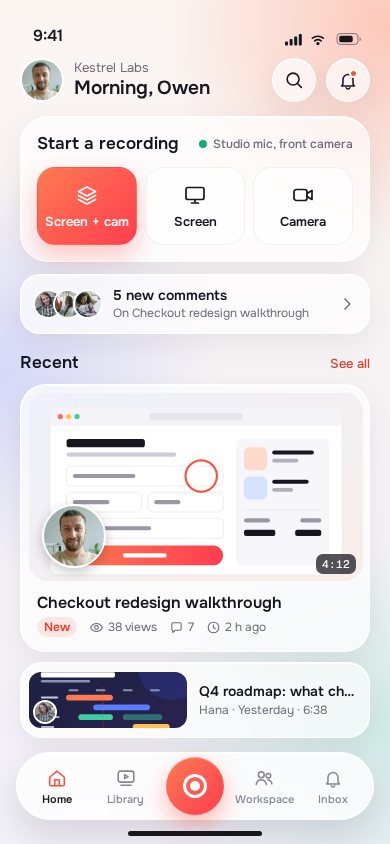
Replay is a complete async video app for teams: welcome, studio permissions and sign in, a home with record modes and recent videos, library, folders and transcript search, a recording setup, a live screen recording with a camera bubble and drawing, trim and smart cleanup, a ready screen with the link copied, the video page with timestamped reactions, transcript, AI summary and chapters, comments, share permissions, viewer insights and viewers, a workspace with spaces and invites, inbox, Pro plan, upgrade, profile and settings. Warm porcelain glass with coral, cobalt and mint.
| Detail | Value |
|---|---|
| Screen type | Home |
| App | Replay: Record and share screen videos |
| Category | Productivity |
| Design language | Glass, light |
| Type | Bricolage Grotesque for headings, Onest for text |
| Colours | #fbf5f2 background, #ffffff surface, #17151f text, #6e6a78 text-muted, #ff4f3b accent, #ffffff accent-contrast, #3b5bff secondary, #ebe7ee border, #14a97c success, #e5402c danger |
What this screen says
- Kestrel Labs
- Morning, Owen
- Start a recordingStudio mic, front camera
- Screen + cam
- Screen
- Camera
- 5 new commentsOn Checkout redesign walkthrough
- Recent
- See all
- Checkout redesign walkthrough
- New 38 views 7 2 h ago
- Q4 roadmap: what changes for support
- Hana · Yesterday · 6:38
- Home
- Library
- Workspace
- Inbox
Around it in Replay
More home screens
- Parley Home: Team messenger
- Docket Home: Task and sprint planner
- Kanso Home: Tasks, calendar and chat
- Margin Home: AI note taking
- Aide Home: Executive AI assistant
- Juno Home: AI chat assistant
- Jot Notes: Quick notes and checklists
- Chrono World: World clock, timers and stopwatch
- Frontdesk Home: Customer support inbox
- Campaign Home: Email marketing campaigns
- Outpost Queue: Schedule social posts
- Pageview Home: Website analytics
Every productivity app home screen
What makes a good home screen
- Put the most important thing first. Decide the one thing most people come for, like today's workout, a balance or the next booking, and give it the top of the screen.
- Make it feel current. Greetings with the time of day, today's date, fresh numbers and recent activity tell people the app is alive and about them.
- Keep quick actions within thumb reach. The two or three things people do most should be one tap away, in the lower part of the screen or a floating button.
- Group related content in clear sections. Use headings and spacing so the screen scans as a few blocks, not a long mixed list.
The full home screen guide and every example
Remix Replay free: describe your own app and it is drawn in this design. Or get its files from $10: Figma, React Native, SwiftUI, Flutter and HTML.