Templates · Home screens · Productivity app · Glance
Glance Home screen
A home screen from Glance, a visual search with the camera app template in a Glass style. Screen 4 of 25.
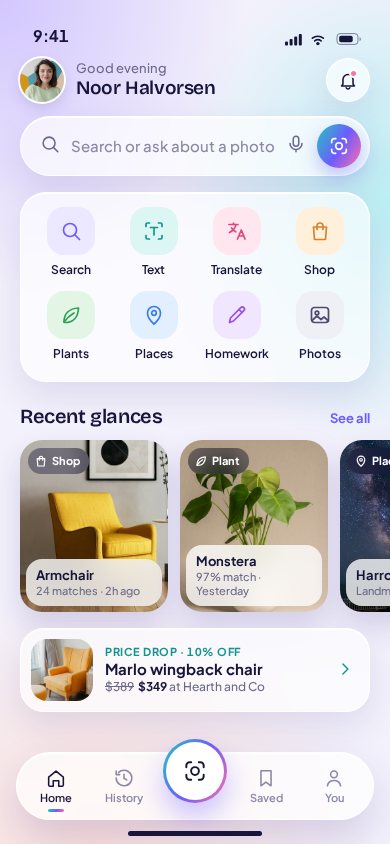
Glance is a complete visual search app: welcome, camera access and sign in, a home with recent glances and modes, a live camera with detected objects, a drag to select area, visual match results, shopping with prices, a product page with sellers, checkout and an order confirmation, a price alert, plant and landmark pages, copy text, live translate on a street sign, step by step homework help, history, collections and a moodboard, monthly insights, notifications, a Plus plan, profile and settings. Pearl and frosted glass with indigo ink and a prism gradient.
| Detail | Value |
|---|---|
| Screen type | Home |
| App | Glance: Visual search with the camera |
| Category | Productivity |
| Design language | Glass, light |
| Type | Bricolage Grotesque for headings, Plus Jakarta Sans for text |
| Colours | #f3f1fb background, #ffffff surface, #17153a text, #6c6a8a text-muted, #6d5cff accent, #ffffff accent-contrast, #22c7c0 secondary, #ff6fa8 highlight, #e6e3f3 border, #14a37f success |
What this screen says
- Good evening
- Noor Halvorsen
- Search or ask about a photo
- Search
- Text
- Translate
- Shop
- Plants
- Places
- Homework
- Photos
- Recent glances
- See all
- Armchair
- 24 matches · 2h ago
- Plant
- Monstera
- 97% match · Yesterday
- Place
- Harrow Point
- Landmark · Sunday
- Price drop · 10% off
- Marlo wingback chair
- $389$349 at Hearth and Co
- Home
- History
- Saved
- You
Around it in Glance
More home screens
- Bench Home: Freelance marketplace
- Convene Home: Video meetings
- Unplug Home: Screen time blocker
- Streak Today: Small days, long chains
- Deskly Home: Hybrid office booking
- Pomo Home: Focus timer
- Postbox Inbox: Email for busy teams
- Daybook Today: Calendar and planner
- Scanly Home: Document scanner
- Keyring Vault: Password manager
- Rota Home: Shift scheduling for hourly teams
- Inkwell Today: Daily journal
Every productivity app home screen
What makes a good home screen
- Put the most important thing first. Decide the one thing most people come for, like today's workout, a balance or the next booking, and give it the top of the screen.
- Make it feel current. Greetings with the time of day, today's date, fresh numbers and recent activity tell people the app is alive and about them.
- Keep quick actions within thumb reach. The two or three things people do most should be one tap away, in the lower part of the screen or a floating button.
- Group related content in clear sections. Use headings and spacing so the screen scans as a few blocks, not a long mixed list.
The full home screen guide and every example
Remix Glance free: describe your own app and it is drawn in this design. Or get its files from $10: Figma, React Native, SwiftUI, Flutter and HTML.