Templates · Home screens · Productivity app · Scribe
Scribe Home screen
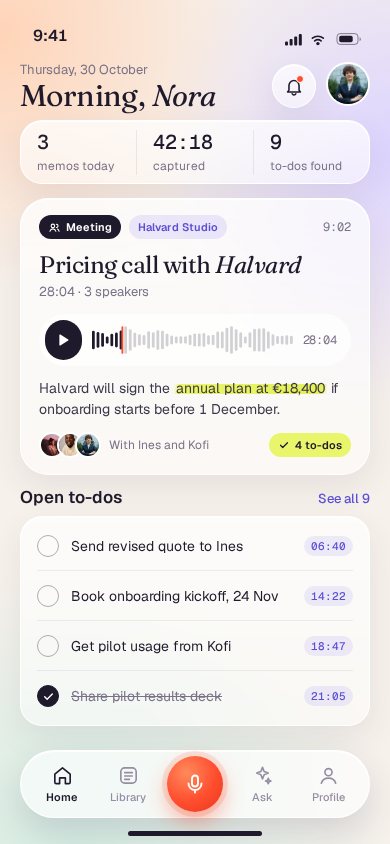
A home screen from Scribe, a voice memos to notes app template in a Glass style. Screen 4 of 25.
Scribe is a complete voice to notes app: welcome, setup and sign in, a home with the latest note and open to-dos, live recording with a running transcript, a transcribing tracker, a note with summary, key points and a pull quote, a karaoke style transcript player with speaker lanes, action items, library, search inside audio, folders, ask your notes, rewrite formats, sharing with a confirmation, saved highlights, audio import, monthly insights, notifications, a Pro plan with checkout and success, profile and settings. Warm pearl glass with aubergine ink, vermilion and a citron highlighter.
| Detail | Value |
|---|---|
| Screen type | Home |
| App | Scribe: Voice memos to notes |
| Category | Productivity |
| Design language | Glass, light |
| Type | Fraunces for headings, Geist for text |
| Colours | #f6f1eb background, #ffffff surface, #1f1a2b text, #7a7287 text-muted, #ff4d2e accent, #ffffff accent-contrast, #8c7cf0 secondary, #e9f56a highlight, #ebe4dc border, #e8361d danger |
What this screen says
- Thursday, 30 October
- Morning, Nora
- 3memos today
- 42:18captured
- 9to-dos found
- Meeting Halvard Studio 9:02
- Pricing call with Halvard
- 28:04 · 3 speakers
- Halvard will sign the annual plan at €18,400 if onboarding starts before 1 December.
- With Ines and Kofi 4 to-dos
- Open to-dos
- See all 9
- Send revised quote to Ines
- Book onboarding kickoff, 24 Nov
- Get pilot usage from Kofi
- Share pilot results deck
- Home
- Library
- Ask
- Profile
Around it in Scribe
More home screens
- Tapline My page: Link-in-bio pages and analytics
- Quill Home: Docs, wikis and databases in one workspace
- Tandem Home: Team chat, channels and huddles
- Shipyard Home: Issue tracking for product teams
- Canvas Recents: Design files and comments on mobile
- Merge Home: Code, pull requests and reviews
- Query Home: AI answers with sources
- Glossa Translate: Translate text, voice and camera
- Layout Home: Design anything from templates
- Tick Today: To-do lists and reminders
- Beacon People: Find your devices and people
- Staffroom Home: HR, payslips and time off
Every productivity app home screen
What makes a good home screen
- Put the most important thing first. Decide the one thing most people come for, like today's workout, a balance or the next booking, and give it the top of the screen.
- Make it feel current. Greetings with the time of day, today's date, fresh numbers and recent activity tell people the app is alive and about them.
- Keep quick actions within thumb reach. The two or three things people do most should be one tap away, in the lower part of the screen or a floating button.
- Group related content in clear sections. Use headings and spacing so the screen scans as a few blocks, not a long mixed list.
The full home screen guide and every example
Remix Scribe free: describe your own app and it is drawn in this design. Or get its files from $10: Figma, React Native, SwiftUI, Flutter and HTML.