Templates · Home screens · Productivity app · Pipeline
Pipeline Today screen
A home screen from Pipeline, a sales CRM on the road app template in an Enterprise style. Screen 3 of 25.
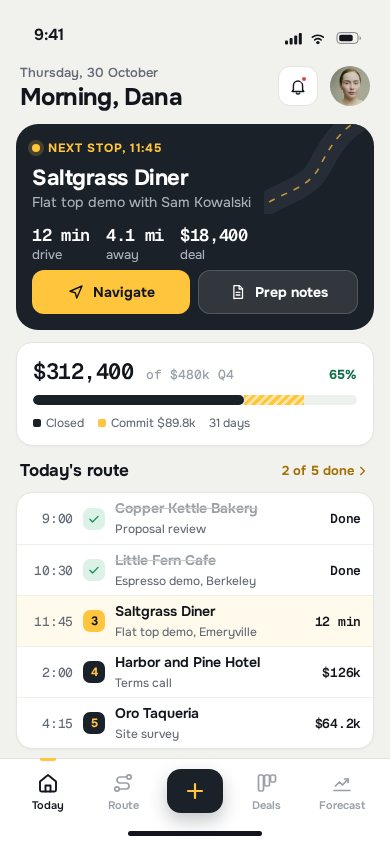
Pipeline is a complete field sales CRM: welcome and sign in, a Today screen with the next stop and quota, a live route map, check in on arrival, a stage board pipeline, deal, account and contact pages, search and a map of nearby accounts, visit logging with a voice note and a business card scanner, a new deal form, a quote with on device sign off and a deal won screen, a forecast dashboard, activity, tasks, notifications, a Pro plan, profile and settings. Stone grey and white with asphalt and marigold.
| Detail | Value |
|---|---|
| Screen type | Home |
| App | Pipeline: Sales CRM on the road |
| Category | Productivity |
| Design language | Enterprise, light |
| Type | Onest |
| Colours | #f1f2ee background, #ffffff surface, #12161c text, #646b75 text-muted, #ffc53d accent, #12161c accent-contrast, #1b2128 secondary, #e3e5df border, #d9453b danger |
What this screen says
- Thursday, 30 October
- Morning, Dana
- Next stop, 11:45
- Saltgrass Diner
- Flat top demo with Sam Kowalski
- 12 mindrive 4.1 miaway $18,400deal
- Navigate
- Prep notes
- $312,400 of $480k Q465%
- Closed Commit $89.8k 31 days
- Today's route
- 2 of 5 done
- Copper Kettle Bakery
- Proposal review
- Done
- Little Fern Cafe
- Espresso demo, Berkeley
- Flat top demo, Emeryville
- 12 min
- Harbor and Pine Hotel
- Terms call
- $126k
- Oro Taqueria
- Site survey
- $64.2k
- Today
- Route
- Deals
- Forecast
Around it in Pipeline
More home screens
- Layout Home: Design anything from templates
- Tick Today: To-do lists and reminders
- Beacon People: Find your devices and people
- Staffroom Home: HR, payslips and time off
- Slot Home: Booking links and meeting scheduling
- Sheet Home: Spreadsheets and databases
- Tunnel Home: VPN and online privacy
- Ping Home: Internet speed test
- Glance Home: Visual search with the camera
- Replay Home: Record and share screen videos
- Easel Boards: Collaborative whiteboard
- Token Codes: Two-factor codes and sign-in approvals
Every productivity app home screen
What makes a good home screen
- Put the most important thing first. Decide the one thing most people come for, like today's workout, a balance or the next booking, and give it the top of the screen.
- Make it feel current. Greetings with the time of day, today's date, fresh numbers and recent activity tell people the app is alive and about them.
- Keep quick actions within thumb reach. The two or three things people do most should be one tap away, in the lower part of the screen or a floating button.
- Group related content in clear sections. Use headings and spacing so the screen scans as a few blocks, not a long mixed list.
The full home screen guide and every example
Remix Pipeline free: describe your own app and it is drawn in this design. Or get its files from $10: Figma, React Native, SwiftUI, Flutter and HTML.