Templates · Home screens · Productivity app · Inkline
Inkline Home screen
A home screen from Inkline, a sign and send contracts app template in a Clinical style. Screen 4 of 25.
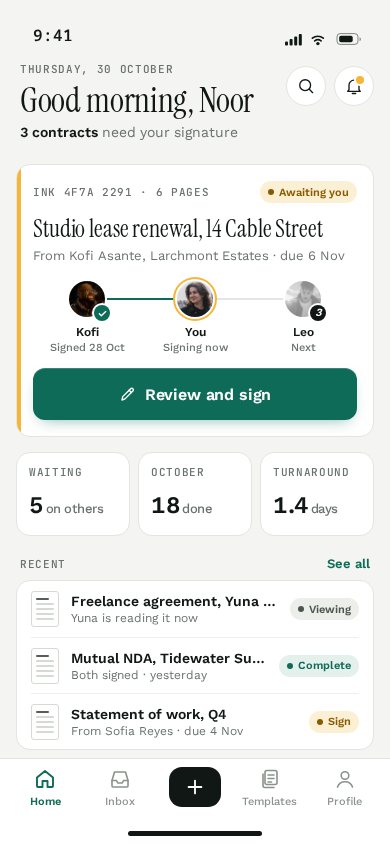
Inkline is a complete contract signing app: welcome, sign in, adopting a signature, a home with what needs your signature, an inbox of envelopes, an envelope with its signer chain, a document viewer with sign here flags, a signature pad, finish and signed, then sending your own: upload, recipients and signing order, placing fields on the page, review and sent, live status as a signer reads, the audit trail certificate, templates, search, contacts, turnaround insights, plans, notifications, profile and settings. Paper white and hairlines with deep viridian ink and amber flags.
| Detail | Value |
|---|---|
| Screen type | Home |
| App | Inkline: Sign and send contracts |
| Category | Productivity |
| Design language | Clinical, light |
| Type | Instrument Serif for headings, Work Sans for text |
| Colours | #f4f5f2 background, #ffffff surface, #111714 text, #69726d text-muted, #0d6b57 accent, #e3f0eb accent-soft, #f5b638 secondary, #e2e5e0 border, #b23a2e danger |
What this screen says
- Thursday, 30 October
- Good morning, Noor
- 3 contracts need your signature
- INK 4F7A 2291 · 6 pages Awaiting you
- Studio lease renewal, 14 Cable Street
- From Kofi Asante, Larchmont Estates · due 6 Nov
- KofiSigned 28 Oct
- YouSigning now
- LeoNext
- Review and sign
- Waiting 5on others
- October 18done
- Turnaround 1.4days
- Recent
- See all
- Freelance agreement, Yuna Park
- Yuna is reading it now
- Viewing
- Mutual NDA, Tidewater Supply
- Both signed · yesterday
- Complete
- Statement of work, Q4
- From Sofia Reyes · due 4 Nov
- Sign
- Home
- Inbox
- Templates
- Profile
Around it in Inkline
More home screens
- Scanly Home: Document scanner
- Keyring Vault: Password manager
- Rota Home: Shift scheduling for hourly teams
- Inkwell Today: Daily journal
- Shortlist Home: Job search and application tracker
- Parley Home: Team messenger
- Docket Home: Task and sprint planner
- Kanso Home: Tasks, calendar and chat
- Margin Home: AI note taking
- Aide Home: Executive AI assistant
- Juno Home: AI chat assistant
- Jot Notes: Quick notes and checklists
Every productivity app home screen
What makes a good home screen
- Put the most important thing first. Decide the one thing most people come for, like today's workout, a balance or the next booking, and give it the top of the screen.
- Make it feel current. Greetings with the time of day, today's date, fresh numbers and recent activity tell people the app is alive and about them.
- Keep quick actions within thumb reach. The two or three things people do most should be one tap away, in the lower part of the screen or a floating button.
- Group related content in clear sections. Use headings and spacing so the screen scans as a few blocks, not a long mixed list.
The full home screen guide and every example
Remix Inkline free: describe your own app and it is drawn in this design. Or get its files from $10: Figma, React Native, SwiftUI, Flutter and HTML.