Templates · Home screens · Productivity app · Easel
Easel Boards screen
A home screen from Easel, a collaborative whiteboard app template in a Playful style. Screen 4 of 25.
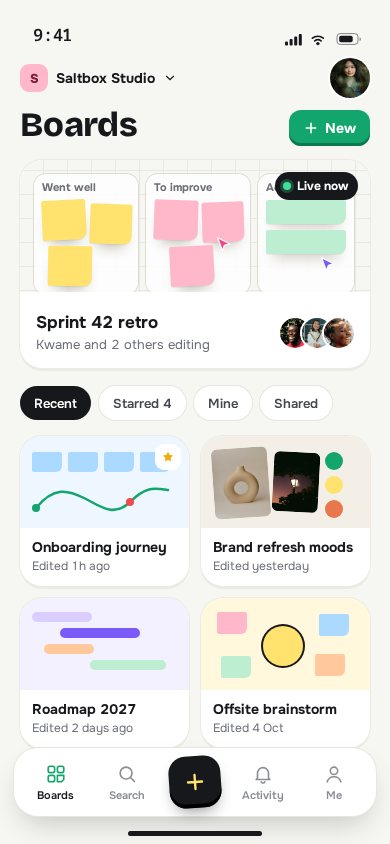
Easel is a complete team whiteboard: welcome, sign in and workspace setup, a boards home with a live board, search, templates and a retro template, the board itself with frames, stickies, connectors and live cursors, sticky editing, shapes and lines, frames, a journey map in follow mode, dot voting with results, a shared timer, comments and a thread, present mode, sharing with an invite sent screen, insights, activity, the Team plan, profile and settings. Warm grid paper with leaf green, lemon and ink.
| Detail | Value |
|---|---|
| Screen type | Home |
| App | Easel: Collaborative whiteboard |
| Category | Productivity |
| Design language | Playful, light |
| Type | Bricolage Grotesque for headings, Onest for text |
| Colours | #f6f6f2 background, #ffffff surface, #17181c text, #6c6e78 text-muted, #12a56c accent, #ffffff accent-contrast, #ffe36e secondary, #e7e6df border, #f04a4a danger |
What this screen says
- SSaltbox Studio
- Boards
- New
- Went well
- To improve
- Actions
- Live now
- Sprint 42 retroKwame and 2 others editing
- Recent
- Starred 4
- Mine
- Shared
- Onboarding journeyEdited 1h ago
- Brand refresh moodsEdited yesterday
- Roadmap 2027Edited 2 days ago
- Offsite brainstormEdited 4 Oct
- Search
- Activity
- Me
Around it in Easel
More home screens
- Unplug Home: Screen time blocker
- Streak Today: Small days, long chains
- Deskly Home: Hybrid office booking
- Pomo Home: Focus timer
- Postbox Inbox: Email for busy teams
- Daybook Today: Calendar and planner
- Scanly Home: Document scanner
- Keyring Vault: Password manager
- Rota Home: Shift scheduling for hourly teams
- Inkwell Today: Daily journal
- Shortlist Home: Job search and application tracker
- Parley Home: Team messenger
Every productivity app home screen
What makes a good home screen
- Put the most important thing first. Decide the one thing most people come for, like today's workout, a balance or the next booking, and give it the top of the screen.
- Make it feel current. Greetings with the time of day, today's date, fresh numbers and recent activity tell people the app is alive and about them.
- Keep quick actions within thumb reach. The two or three things people do most should be one tap away, in the lower part of the screen or a floating button.
- Group related content in clear sections. Use headings and spacing so the screen scans as a few blocks, not a long mixed list.
The full home screen guide and every example
Remix Easel free: describe your own app and it is drawn in this design. Or get its files from $10: Figma, React Native, SwiftUI, Flutter and HTML.