Templates · Form and input screens · Productivity app · Shortlist
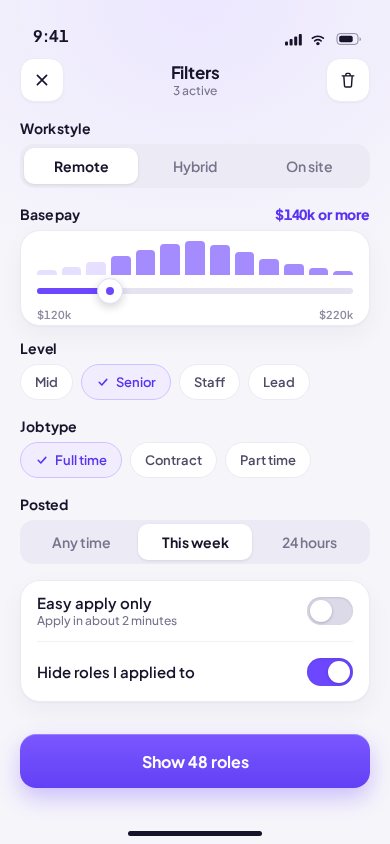
Shortlist Filters screen
A form screen from Shortlist, a job search and application tracker app template in an Enterprise style. Screen 9 of 25.
Shortlist is a complete job search app: welcome, sign in, a code and job preferences, a home with today's interview, the pipeline and top matches, search with filters and saved searches, a job page with a match breakdown, the company, a two step application with review and a sent confirmation, a tracker board, one application's timeline, the interview, prep questions with a practice timer, salary insights with a pay distribution, an offer breakdown, a Plus plan, notifications, profile and settings. Every company has its own drawn monogram and every role shows how well it matches.
| Detail | Value |
|---|---|
| Screen type | Form |
| App | Shortlist: Job search and application tracker |
| Category | Productivity |
| Design language | Enterprise, light |
| Type | Plus Jakarta Sans |
| Colours | #f6f5fa background, #ffffff surface, #17132b text, #77738c text-muted, #6c47ff accent, #ffffff accent-contrast, #12a56b secondary, #eceaf4 border, #e5484d danger |
What this screen says
- Filters
- 3 active
- Work style
- Remote Hybrid On site
- Base pay$140k or more
- $120k$220k
- Level
- Mid Senior Staff Lead
- Job type
- Full time Contract Part time
- Posted
- Any time This week 24 hours
- Easy apply only
- Apply in about 2 minutes
- Hide roles I applied to
- Show 48 roles
Around it in Shortlist
More form and input screens
- Shipyard Comments: Issue tracking for product teams
- Canvas New comment: Design files and comments on mobile
- Merge Review: Code, pull requests and reviews
- Query Research: AI answers with sources
- Glossa New document: Translate text, voice and camera
- Layout Edit text: Design anything from templates
- Tick Quick add: To-do lists and reminders
- Beacon Notify me: Find your devices and people
- Staffroom Request time off: HR, payslips and time off
- Slot New event type: Booking links and meeting scheduling
- Sheet Add field: Spreadsheets and databases
- Tunnel Double hop: VPN and online privacy
Every productivity app form screen
What makes a good form screen
- Ask only what you need. Every field is a reason to stop. Remove optional fields or move them to later.
- Labels above fields. Visible labels stay readable while people type; placeholder-only labels disappear.
- Use the right keyboard and input. Number pads for amounts, email keyboards for email, pickers for dates and autofill for addresses and codes.
- Validate as people go. Show problems next to the field when people leave it, in words that say how to fix them.
The full form screen guide and every example
Remix Shortlist free: describe your own app and it is drawn in this design. Or get its files from $10: Figma, React Native, SwiftUI, Flutter and HTML.