Templates · Search and explore screens · Productivity app · Jot
Jot Search screen
A search screen from Jot, a quick notes and checklists app template in a Minimal style. Screen 14 of 25.
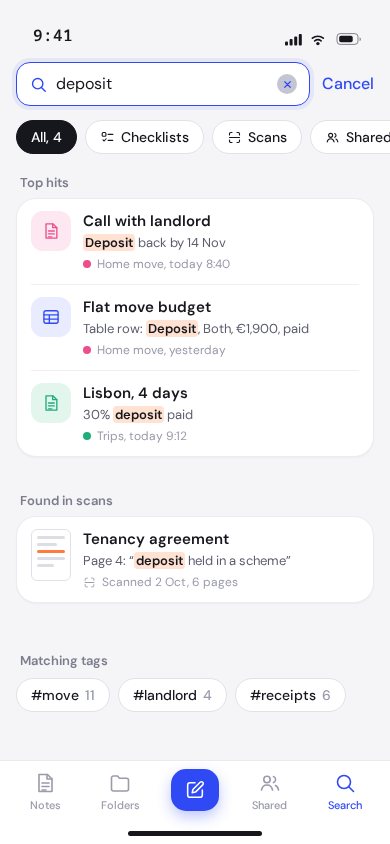
Jot is a complete everyday notes app: welcome, storage setup, sign in, a notes home with pinned cards and today's notes, folders with smart folders, a gallery folder, a note with a photo and checklist, a shared grocery checklist, a budget table, a sketch canvas with a tool tray, a document camera and the scanned result with found text, a format sheet, search that reaches inside tables and scans, tags, shared notes with live collaboration, sharing and an invite confirmation, a locked note, insights, notifications, a Plus plan, profile and settings. Cool paper grey and white with cobalt ink and a tangerine fold.
| Detail | Value |
|---|---|
| Screen type | Search |
| App | Jot: Quick notes and checklists |
| Category | Productivity |
| Design language | Minimal, light |
| Type | Lexend for headings, DM Sans for text |
| Colours | #f5f5f8 background, #ffffff surface, #16161d text, #7c7d8c text-muted, #2f49f5 accent, #ffffff accent-contrast, #ff7a3d secondary, #ebebf1 border, #ec4f8b danger |
What this screen says
- deposit
- Cancel
- All, 4 Checklists Scans Shared
- Top hits
- Call with landlord
- Deposit back by 14 Nov
- Home move, today 8:40
- Flat move budget
- Table row: Deposit, Both, €1,900, paid
- Home move, yesterday
- Lisbon, 4 days
- 30% deposit paid
- Trips, today 9:12
- Found in scans
- Tenancy agreement
- Page 4: “deposit held in a scheme”
- Scanned 2 Oct, 6 pages
- Matching tags
- #move11 #landlord4 #receipts6
- Notes
- Folders
- Shared
- Search
Around it in Jot
More search and explore screens
- Tick Browse: To-do lists and reminders
- Beacon Search: Find your devices and people
- Staffroom Directory: HR, payslips and time off
- Slot Search: Booking links and meeting scheduling
- Sheet Filter: Spreadsheets and databases
- Tunnel Map: VPN and online privacy
- Ping Servers: Internet speed test
- Glance Results: Visual search with the camera
- Replay Search: Record and share screen videos
- Easel Search: Collaborative whiteboard
- Token Search: Two-factor codes and sign-in approvals
- Beam Search: Send big files
Every productivity app search screen
What makes a good search screen
- Show something before people type. Recent searches, popular items or categories make the empty search screen useful and save typing.
- Suggest as people type. Autocomplete with matching items, not only matching words, lets people jump straight to a result.
- Make filters visible and reversible. Show active filters as chips that can be removed in one tap, and the number of results as filters change.
- Forgive typos. Close matches and "Did you mean" stop a spelling mistake from ending in an empty screen.
The full search screen guide and every example
Remix Jot free: describe your own app and it is drawn in this design. Or get its files from $10: Figma, React Native, SwiftUI, Flutter and HTML.