Templates · Home screens · Finance app · Keel
Keel Home screen
A home screen from Keel, a corporate cards and spend controls app template in an Enterprise style. Screen 4 of 25.
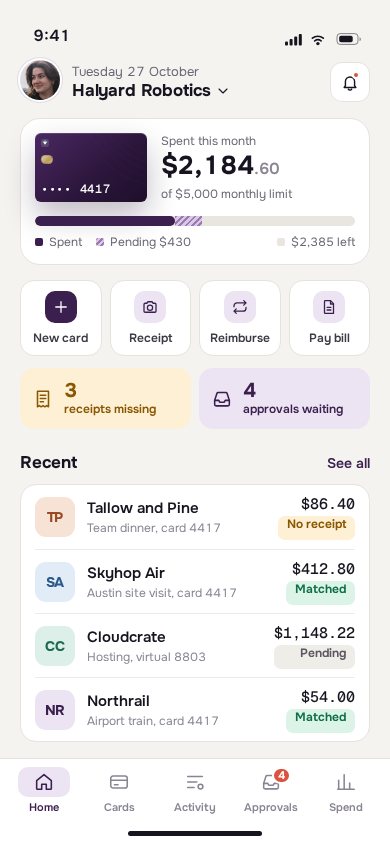
Keel is a complete corporate card and spend app: welcome, work email sign in and a code, a home with your card, its limit rail and the to-dos, physical and vendor-locked virtual cards with controls, a new card request with approval, activity with missing receipts, a transaction with its policy check, a receipt camera with auto-match, a manager approvals inbox, spend by department, policies, reimbursements, bill pay with a scheduled payment, notifications, a Plus plan, profile and settings. Stone and white with deep aubergine, mint and amber.
| Detail | Value |
|---|---|
| Screen type | Home |
| App | Keel: Corporate cards and spend controls |
| Category | Finance |
| Design language | Enterprise, light |
| Type | Geist Mono for headings, Onest for text |
| Colours | #f4f3f0 background, #ffffff surface, #17141f text, #6c6875 text-muted, #3b1f4e accent, #ffffff accent-contrast, #5fd6a4 secondary, #e6e3dd border, #d9533f danger |
What this screen says
- Tuesday 27 October Halyard Robotics
- •••• 4417
- Spent this month $2,184.60of $5,000 monthly limit
- Spent Pending $430 $2,385 left
- New card
- Receipt
- Reimburse
- Pay bill
- 3receipts missing
- 4approvals waiting
- Recent
- See all
- TP
- Tallow and PineTeam dinner, card 4417
- $86.40No receipt
- SA
- Skyhop AirAustin site visit, card 4417
- $412.80Matched
- CC
- CloudcrateHosting, virtual 8803
- $1,148.22Pending
- NR
- NorthrailAirport train, card 4417
- $54.00Matched
- Home
- Cards
- Activity
- 4 Approvals
- Spend
Around it in Keel
More home screens
- Billfold Wallet: Cards, passes and tickets wallet
- Payly Home: UPI payments, recharges and bills
- Crest Home: Credit card bills and rewards
- Storefront Home: Run your online store
- Bastion Accounts: Everyday banking from a big bank
- Later Home: Buy now, pay in four
- Standing Home: Credit score and reports
- Accrue Home: Retirement and pension planner
- Levy Home: Taxes for freelancers
- Bullion Home: Gold and silver savings
- Wage Home: Get paid as you work
- Keystone Home: Mortgage and home loan tracker
What makes a good home screen
- Put the most important thing first. Decide the one thing most people come for, like today's workout, a balance or the next booking, and give it the top of the screen.
- Make it feel current. Greetings with the time of day, today's date, fresh numbers and recent activity tell people the app is alive and about them.
- Keep quick actions within thumb reach. The two or three things people do most should be one tap away, in the lower part of the screen or a floating button.
- Group related content in clear sections. Use headings and spacing so the screen scans as a few blocks, not a long mixed list.
The full home screen guide and every example
Remix Keel free: describe your own app and it is drawn in this design. Or get its files from $10: Figma, React Native, SwiftUI, Flutter and HTML.