Templates · Home screens · Finance app · Giftly
Giftly Home screen
A home screen from Giftly, a finance app template in a Luxury style. Screen 3 of 25.
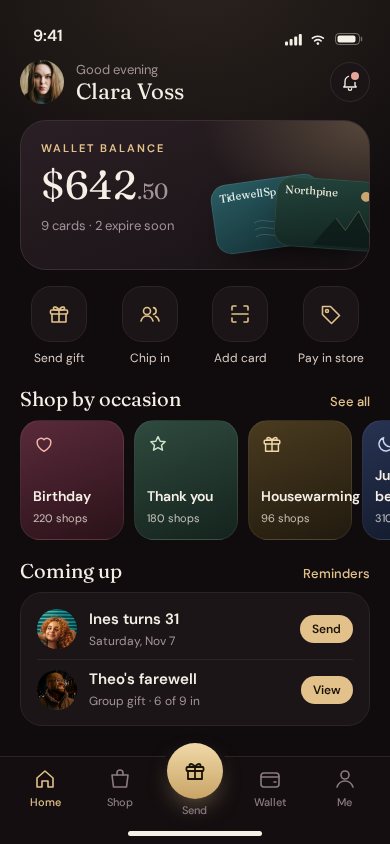
Giftly is a complete gift card app: welcome and sign in, a home with the wallet balance, quick actions, occasions and upcoming birthdays, browse by occasion and shop, a shop page, card design, amount, a video or written note, scheduled delivery by text or email, checkout and a sent confirmation, the recipient's unwrap reveal, a wallet of stored cards with balances, a card with its history, a barcode to redeem at the till, scanning a plastic card in and its added state, a group gift and chip in, spending insights, sent gifts, reminders for low balances and expiry, a Reserve plan, profile and settings. Plum black with champagne gold and a soft rose.
| Detail | Value |
|---|---|
| Screen type | Home |
| App | Giftly: Gift cards, sent and stored |
| Category | Finance |
| Design language | Luxury, dark |
| Type | Fraunces for headings, DM Sans for text |
| Colours | #100c0e background, #1b1518 surface, #f6efe6 text, #a39398 text-muted, #e2c28a accent, #1a1206 accent-contrast, #e7a59a secondary, #2c2327 border, #ff7a6e danger |
What this screen says
- Good evening
- Clara Voss
- Wallet balance
- 9 cards · 2 expire soon
- Tidewell Spa
- Northpine
- Send gift
- Chip in
- Add card
- Pay in store
- Shop by occasion
- See all
- Birthday
- 220 shops
- Thank you
- 180 shops
- Housewarming
- 96 shops
- Just because
- 310 shops
- Coming up
- Reminders
- Ines turns 31
- Saturday, Nov 7
- Send
- Theo's farewell
- Group gift · 6 of 9 in
- View
- Home
- Shop
Around it in Giftly
More home screens
- Billable Home: Time tracking and invoices, kept like a ledger
- Lease Home: Your tenancy, drawn to plan
- Claim Home: Expenses, filed like a till receipt
- Tally Home: Monthly budgeting
- Divvy Home: Split bills with friends
- Ticker Home: Stock investing
- Burrow Home: Shared savings pots
- Remit Home: International money transfer
- Piggy Home: Pocket money for kids
- Settle Home: Bill payments and banking
- Fathom Home: Crypto wallet
- Marigold Home: Mobile banking
What makes a good home screen
- Put the most important thing first. Decide the one thing most people come for, like today's workout, a balance or the next booking, and give it the top of the screen.
- Make it feel current. Greetings with the time of day, today's date, fresh numbers and recent activity tell people the app is alive and about them.
- Keep quick actions within thumb reach. The two or three things people do most should be one tap away, in the lower part of the screen or a floating button.
- Group related content in clear sections. Use headings and spacing so the screen scans as a few blocks, not a long mixed list.
The full home screen guide and every example
Remix Giftly free: describe your own app and it is drawn in this design. Or get its files from $10: Figma, React Native, SwiftUI, Flutter and HTML.