Templates · Home screens · Finance app · Billfold
Billfold Wallet screen
A home screen from Billfold, a finance app template in a Glass style. Screen 3 of 25.
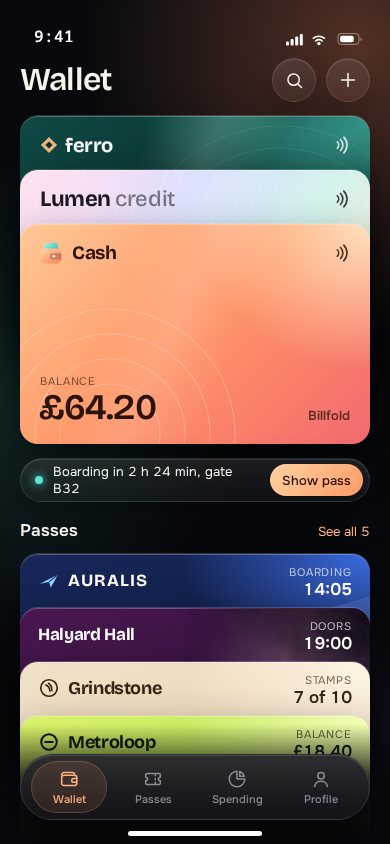
Billfold is a complete everyday wallet: welcome, sign in, a wallet home with stacked cards and passes, a card with its balance and latest activity, transactions and a receipt with a map, card details with freeze and limits, scanning and verifying a new card, tap to pay and a paid screen, a passes list, a boarding pass with live flight status, a concert ticket, a coffee stamp card, a transit card with top up, spending insights, search, notifications, a Plus plan, profile and settings. Near black glass with apricot and teal light.
| Detail | Value |
|---|---|
| Screen type | Home |
| App | Billfold: Cards, passes and tickets wallet |
| Category | Finance |
| Design language | Glass, dark |
| Type | Bricolage Grotesque for headings, Onest for text |
| Colours | #08090d background, #16161d surface, #f6f2ec text, #9b98a3 text-muted, #ff9a66 accent, #2b1407 accent-contrast, #5fe3cf secondary, #2a2a33 border, #ff6b6b danger |
What this screen says
- Wallet
- ferro
- •••• 4417
- DEBIT
- Lumen credit
- •••• 2086
- Cash
- Balance
- Billfold
- Boarding in 2 h 24 min, gate B32
- Show pass
- Passes
- See all 5
- AURALIS
- Boarding
- London
- LHR
- Lisbon
- LIS
- Flight
- AU 482
- Gate
- B32
- Seat
- 14A
- Zone
- Halyard Hall
- Doors
- Sat 8 Nov
- The Low
Around it in Billfold
More home screens
- Storefront Home: Run your online store
- Bastion Accounts: Everyday banking from a big bank
- Later Home: Buy now, pay in four
- Standing Home: Credit score and reports
- Accrue Home: Retirement and pension planner
- Levy Home: Taxes for freelancers
- Bullion Home: Gold and silver savings
- Wage Home: Get paid as you work
- Keystone Home: Mortgage and home loan tracker
- Rebate Home: Cashback card and rewards
- Aegis Home: Insurance policies and claims
- Till Today: Card reader and sales for small shops
What makes a good home screen
- Put the most important thing first. Decide the one thing most people come for, like today's workout, a balance or the next booking, and give it the top of the screen.
- Make it feel current. Greetings with the time of day, today's date, fresh numbers and recent activity tell people the app is alive and about them.
- Keep quick actions within thumb reach. The two or three things people do most should be one tap away, in the lower part of the screen or a floating button.
- Group related content in clear sections. Use headings and spacing so the screen scans as a few blocks, not a long mixed list.
The full home screen guide and every example
Remix Billfold free: describe your own app and it is drawn in this design. Or get its files from $10: Figma, React Native, SwiftUI, Flutter and HTML.