Templates · Home screens · Finance app · Payly
Payly Home screen
A home screen from Payly, a finance app template in a Playful style. Screen 5 of 25.
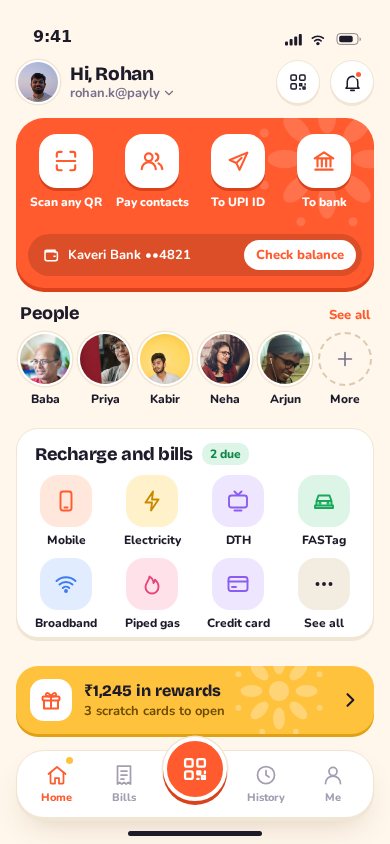
Payly is a complete everyday payments app for India: welcome, language, mobile number and OTP, a home with money transfers, people and bills, a QR scanner, an amount pad, the UPI PIN pad and a payment receipt, contacts and a payment chat, mobile recharge and plans, bill categories and an electricity bill, history and a transaction ticket, bank accounts with a balance check, monthly spends, scratch card rewards, a Club plan, notifications, profile and settings. Warm cream with chilli orange, marigold and leaf green.
| Detail | Value |
|---|---|
| Screen type | Home |
| App | Payly: UPI payments, recharges and bills |
| Category | Finance |
| Design language | Playful, light |
| Type | Bricolage Grotesque for headings, Nunito for text |
| Colours | #fff7ec background, #ffffff surface, #1d1b2a text, #77708a text-muted, #ff5b2e accent, #ffffff accent-contrast, #ffc23c secondary, #f1e5d3 border, #e5383b danger |
What this screen says
- Hi, Rohanrohan.k@payly
- Scan any QR
- Pay contacts
- To UPI ID
- To bank
- Kaveri Bank ••4821Check balance
- People
- See all
- Baba
- Priya
- Kabir
- Neha
- Arjun
- More
- Recharge and bills 2 due
- Mobile
- Electricity
- DTH
- FASTag
- Broadband
- Piped gas
- Credit card
- ₹1,245 in rewards3 scratch cards to open
- Home
- Bills
- History
- Me
Around it in Payly
More home screens
- Payday Home: Payroll for small teams
- Roundup Home: Invest your spare change
- Envelope Budget: Give every dollar a job
- Recur Home: Track and cancel subscriptions
- Keel Home: Corporate cards and spend controls
- Giftly Home: Gift cards, sent and stored
- Zap Home: Pay friends with a note
- Billfold Wallet: Cards, passes and tickets wallet
- Crest Home: Credit card bills and rewards
- Storefront Home: Run your online store
- Bastion Accounts: Everyday banking from a big bank
- Later Home: Buy now, pay in four
What makes a good home screen
- Put the most important thing first. Decide the one thing most people come for, like today's workout, a balance or the next booking, and give it the top of the screen.
- Make it feel current. Greetings with the time of day, today's date, fresh numbers and recent activity tell people the app is alive and about them.
- Keep quick actions within thumb reach. The two or three things people do most should be one tap away, in the lower part of the screen or a floating button.
- Group related content in clear sections. Use headings and spacing so the screen scans as a few blocks, not a long mixed list.
The full home screen guide and every example
Remix Payly free: describe your own app and it is drawn in this design. Or get its files from $10: Figma, React Native, SwiftUI, Flutter and HTML.