Templates · Settings screens · Productivity app · Opal
Opal Settings screen
A settings screen from Opal, a studio dashboard app template in a Glass style. Screen 21 of 21.
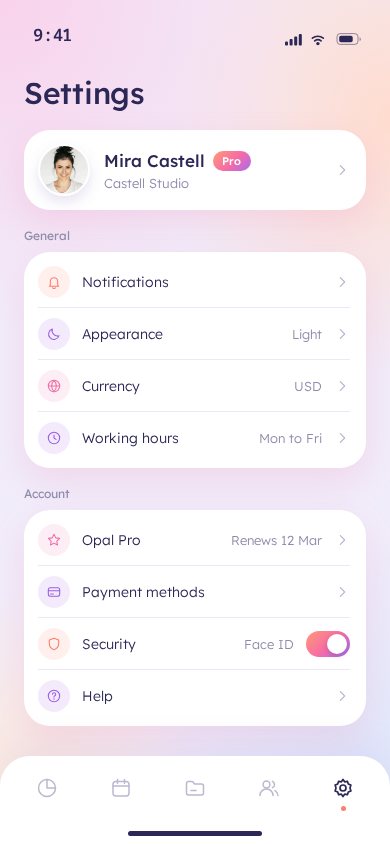
Opal is a complete studio app for freelancers and small agencies: onboarding, sign in, a dashboard with earnings, projects with briefs, tasks, a calendar and schedule, clients, invoices, a time tracker, search, a Pro paywall, profile and settings. Frosted white panels float on a pink, peach and lavender wash, with navy type and one coral to violet gradient.
| Detail | Value |
|---|---|
| Screen type | Settings |
| App | Opal: Studio dashboard |
| Category | Productivity |
| Design language | Glass, light |
| Type | Lexend |
| Colours | #f3eefb background, #ffffff surface, #2b2756 text, #8f8cab text-muted, #ff7d6e accent, #ffffff accent-contrast, #9b5de5 secondary, #ece8f6 border, #34c3a0 success |
What this screen says
- Settings
- Mira CastellPro
- Castell Studio
- General
- Notifications
- Appearance Light
- Currency USD
- Working hours Mon to Fri
- Account
- Opal Pro Renews 12 Mar
- Payment methods
- Security Face ID
- Help
Around it in Opal
More settings screens
- Easel Settings: Collaborative whiteboard
- Token Backups: Two-factor codes and sign-in approvals
- Beam Brand page: Send big files
- Parchment Settings: Documents, edit and share
- Lectern Settings: Slides and presenter remote
- Ringer Settings: Phone, contacts and voicemail
- Pipeline Settings: Sales CRM on the road
- Aim Settings: Goals and key results
- Scribe Settings: Voice memos to notes
- Inkline Settings: Sign and send contracts
- Dispatch Settings: Field service jobs for technicians
- Stash Display: Read-it-later and highlights
Every productivity app settings screen
What makes a good settings screen
- Group options into clear sections. Account, notifications, privacy, appearance and help, with headings, so people scan to the right group.
- Label settings by their effect. "Daily reminder at 8:00" is clearer than "Reminders". Add a short description under options that need one.
- Use the right control. Toggles for on and off, a row that opens a list for choices, and sliders only for ranges.
- Apply changes immediately. Most mobile settings take effect when changed, with no Save button to forget.
The full settings screen guide and every example
Remix Opal free: describe your own app and it is drawn in this design. Or get its files from $10: Figma, React Native, SwiftUI, Flutter and HTML.