Templates · Settings screens · Productivity app · Pipeline
Pipeline Settings screen
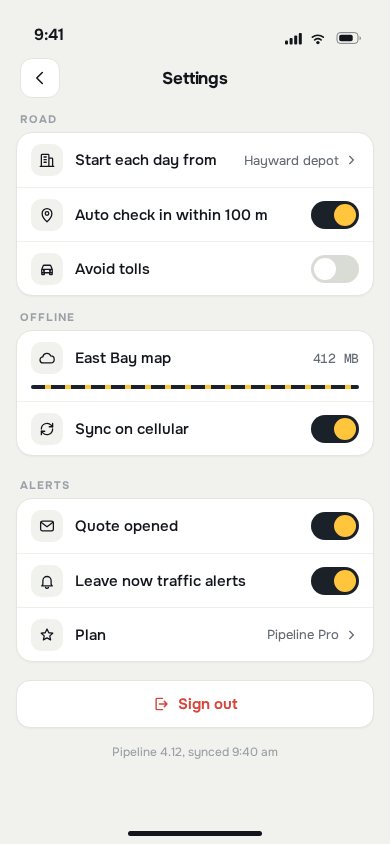
A settings screen from Pipeline, a sales CRM on the road app template in an Enterprise style. Screen 25 of 25.
Pipeline is a complete field sales CRM: welcome and sign in, a Today screen with the next stop and quota, a live route map, check in on arrival, a stage board pipeline, deal, account and contact pages, search and a map of nearby accounts, visit logging with a voice note and a business card scanner, a new deal form, a quote with on device sign off and a deal won screen, a forecast dashboard, activity, tasks, notifications, a Pro plan, profile and settings. Stone grey and white with asphalt and marigold.
| Detail | Value |
|---|---|
| Screen type | Settings |
| App | Pipeline: Sales CRM on the road |
| Category | Productivity |
| Design language | Enterprise, light |
| Type | Onest |
| Colours | #f1f2ee background, #ffffff surface, #12161c text, #646b75 text-muted, #ffc53d accent, #12161c accent-contrast, #1b2128 secondary, #e3e5df border, #d9453b danger |
What this screen says
- Settings
- Road
- Start each day fromHayward depot
- Auto check in within 100 m
- Avoid tolls
- Offline
- East Bay map412 MB
- Sync on cellular
- Alerts
- Quote opened
- Leave now traffic alerts
- PlanPipeline Pro
- Sign out
- Pipeline 4.12, synced 9:40 am
Around it in Pipeline
More settings screens
- Frontdesk Settings: Customer support inbox
- Campaign Settings: Email marketing campaigns
- Outpost Settings: Schedule social posts
- Pageview Settings: Website analytics
- Polish Settings: Writing assistant and keyboard
- Tapline Settings: Link-in-bio pages and analytics
- Quill Settings: Docs, wikis and databases in one workspace
- Tandem Settings: Team chat, channels and huddles
- Shipyard Settings: Issue tracking for product teams
- Canvas Settings: Design files and comments on mobile
- Merge Settings: Code, pull requests and reviews
- Query Settings: AI answers with sources
Every productivity app settings screen
What makes a good settings screen
- Group options into clear sections. Account, notifications, privacy, appearance and help, with headings, so people scan to the right group.
- Label settings by their effect. "Daily reminder at 8:00" is clearer than "Reminders". Add a short description under options that need one.
- Use the right control. Toggles for on and off, a row that opens a list for choices, and sliders only for ranges.
- Apply changes immediately. Most mobile settings take effect when changed, with no Save button to forget.
The full settings screen guide and every example
Remix Pipeline free: describe your own app and it is drawn in this design. Or get its files from $10: Figma, React Native, SwiftUI, Flutter and HTML.