Templates · Settings screens · Productivity app · Aim
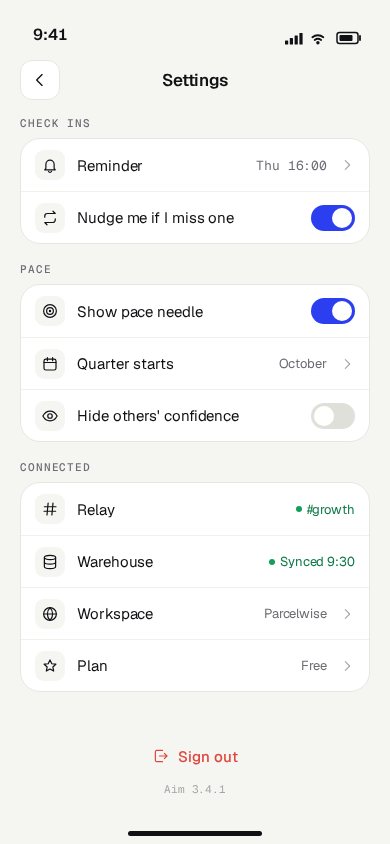
Aim Settings screen
A settings screen from Aim, a goals and key results app template in a Minimal style. Screen 25 of 25.
Aim is a complete objectives and key results app: welcome, setup and sign in, a today view with the quarter ruler, objectives and key result pages, a weekly check-in with confidence and a saved screen, new objectives and key results, an alignment tree, insights, team and teammate pages, search, a focus timer, a quarter close with grades, an updates feed, an audio weekly brief, plans, notifications, profile and settings. Paper white and ink with a single cobalt accent and quiet green, amber and red for status.
| Detail | Value |
|---|---|
| Screen type | Settings |
| App | Aim: Goals and key results |
| Category | Productivity |
| Design language | Minimal, light |
| Type | Geist Mono for headings, Geist for text |
| Colours | #f5f5f2 background, #ffffff surface, #101114 text, #6c6d73 text-muted, #2b3ff0 accent, #ffffff accent-contrast, #eceefe secondary, #e7e7e2 border, #149e5c success, #d98a00 warning, #e0473f danger |
What this screen says
- Settings
- Check ins
- Reminder Thu 16:00
- Nudge me if I miss one
- Pace
- Show pace needle
- Quarter starts October
- Hide others' confidence
- Connected
- Relay #growth
- Warehouse Synced 9:30
- Workspace Parcelwise
- Plan Free
- Sign out
- Aim 3.4.1
Around it in Aim
More settings screens
- Query Settings: AI answers with sources
- Glossa Settings: Translate text, voice and camera
- Layout Settings: Design anything from templates
- Tick Settings: To-do lists and reminders
- Beacon Left behind: Find your devices and people
- Staffroom Settings: HR, payslips and time off
- Slot Settings: Booking links and meeting scheduling
- Sheet Settings: Spreadsheets and databases
- Tunnel Protocol: VPN and online privacy
- Ping Settings: Internet speed test
- Glance Settings: Visual search with the camera
- Replay Settings: Record and share screen videos
Every productivity app settings screen
What makes a good settings screen
- Group options into clear sections. Account, notifications, privacy, appearance and help, with headings, so people scan to the right group.
- Label settings by their effect. "Daily reminder at 8:00" is clearer than "Reminders". Add a short description under options that need one.
- Use the right control. Toggles for on and off, a row that opens a list for choices, and sliders only for ranges.
- Apply changes immediately. Most mobile settings take effect when changed, with no Save button to forget.
The full settings screen guide and every example
Remix Aim free: describe your own app and it is drawn in this design. Or get its files from $10: Figma, React Native, SwiftUI, Flutter and HTML.