Templates · Profile screens · Productivity app · Opal
Opal Profile screen
A profile screen from Opal, a studio dashboard app template in a Glass style. Screen 20 of 21.
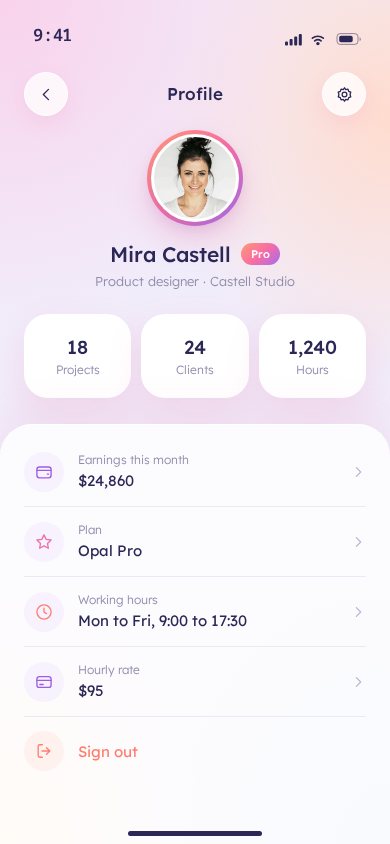
Opal is a complete studio app for freelancers and small agencies: onboarding, sign in, a dashboard with earnings, projects with briefs, tasks, a calendar and schedule, clients, invoices, a time tracker, search, a Pro paywall, profile and settings. Frosted white panels float on a pink, peach and lavender wash, with navy type and one coral to violet gradient.
| Detail | Value |
|---|---|
| Screen type | Profile |
| App | Opal: Studio dashboard |
| Category | Productivity |
| Design language | Glass, light |
| Type | Lexend |
| Colours | #f3eefb background, #ffffff surface, #2b2756 text, #8f8cab text-muted, #ff7d6e accent, #ffffff accent-contrast, #9b5de5 secondary, #ece8f6 border, #34c3a0 success |
What this screen says
- Profile
- Mira CastellPro
- Product designer · Castell Studio
- 18Projects
- 24Clients
- 1,240Hours
- Earnings this month
- Plan
- Opal Pro
- Working hours
- Mon to Fri, 9:00 to 17:30
- Hourly rate
- Sign out
Around it in Opal
More profile screens
- Shortlist Profile: Job search and application tracker
- Parley Profile: Team messenger
- Docket Teammate: Task and sprint planner
- Kanso Profile: Tasks, calendar and chat
- Margin Profile: AI note taking
- Aide Profile: Executive AI assistant
- Juno Profile: AI chat assistant
- Jot Profile: Quick notes and checklists
- Chrono Profile: World clock, timers and stopwatch
- Frontdesk Customer: Customer support inbox
- Campaign Contact: Email marketing campaigns
- Outpost Channel: Schedule social posts
Every productivity app profile screen
What makes a good profile screen
- Lead with identity. Photo, name and one line about the person at the top. It confirms whose profile this is.
- Show meaningful stats. Two to four numbers that matter in this app, like workouts, followers, books read or streak.
- Make editing obvious for the owner. An Edit profile button near the top, shown only on your own profile.
- Organise content with tabs. Posts, activity, saved or achievements as tabs keep a long profile tidy.
The full profile screen guide and every example
Remix Opal free: describe your own app and it is drawn in this design. Or get its files from $10: Figma, React Native, SwiftUI, Flutter and HTML.