Templates · Settings screens · Productivity app · Ringer
Ringer Settings screen
A settings screen from Ringer, a productivity app template in a Minimal style. Screen 25 of 25.
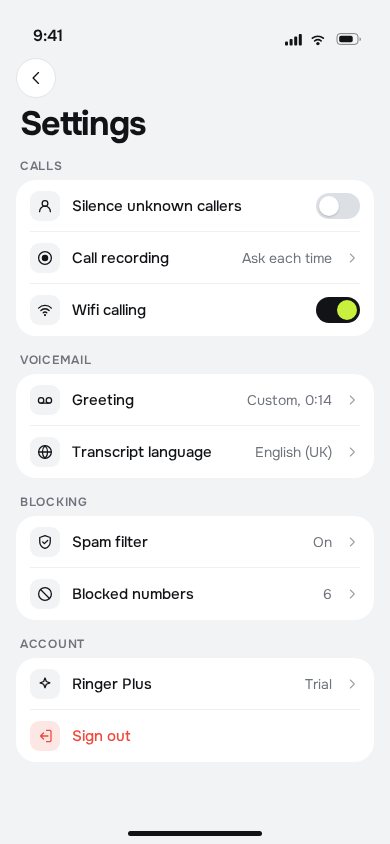
Ringer is a complete phone app: welcome, permissions, sign in with a texted code, favourites, recents with missed calls and filtered spam, call details, contacts with an alphabet index, a contact card, a new contact form, search across people and voicemail, a keypad, an incoming call, the in-call screen, a call recording consent sheet and a call summary, visual voicemail with a live transcript, a spam filter, blocking a number with a confirmation, call stats, a Plus plan, my card and settings. Porcelain and white with ink, signal lime and a coral for missed and declined calls.
| Detail | Value |
|---|---|
| Screen type | Settings |
| App | Ringer: Phone, contacts and voicemail |
| Category | Productivity |
| Design language | Minimal, light |
| Type | Onest |
| Colours | #f2f3f5 background, #ffffff surface, #111316 text, #6e737c text-muted, #c8f03c accent, #111316 accent-contrast, #1b1d21 secondary, #e3e5e9 border, #f2473a danger, #b26f00 warning |
What this screen says
- Settings
- Calls
- Silence unknown callers
- Call recording
- Ask each time
- Wifi calling
- Voicemail
- Greeting
- Custom, 0:14
- Transcript language
- English (UK)
- Blocking
- Spam filter
- On
- Blocked numbers
- Account
- Ringer Plus
- Trial
- Sign out
Around it in Ringer
More settings screens
- Inkwell Settings: Daily journal
- Shortlist Settings: Job search and application tracker
- Parley Settings: Team messenger
- Docket Settings: Task and sprint planner
- Kanso Settings: Tasks, calendar and chat
- Margin Settings: AI note taking
- Aide Settings: Executive AI assistant
- Juno Settings: AI chat assistant
- Opal Settings: Studio dashboard
- Jot Settings: Quick notes and checklists
- Chrono Settings: World clock, timers and stopwatch
- Frontdesk Settings: Customer support inbox
Every productivity app settings screen
What makes a good settings screen
- Group options into clear sections. Account, notifications, privacy, appearance and help, with headings, so people scan to the right group.
- Label settings by their effect. "Daily reminder at 8:00" is clearer than "Reminders". Add a short description under options that need one.
- Use the right control. Toggles for on and off, a row that opens a list for choices, and sliders only for ranges.
- Apply changes immediately. Most mobile settings take effect when changed, with no Save button to forget.
The full settings screen guide and every example
Remix Ringer free: describe your own app and it is drawn in this design. Or get its files from $10: Figma, React Native, SwiftUI, Flutter and HTML.