Templates · Home screens · Productivity app · Dispatch
Dispatch Today screen
A home screen from Dispatch, a field service jobs for technicians app template in an Enterprise style. Screen 3 of 25.
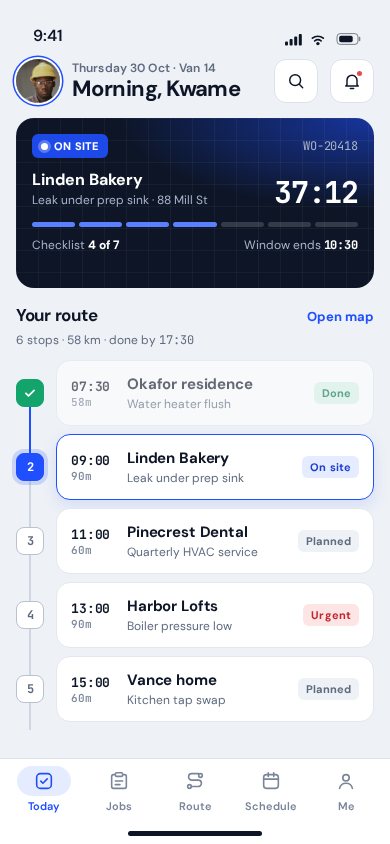
Dispatch is a complete field service app for technicians: welcome and company sign in, a today screen with the day's route spine, jobs, search, a work order ticket, the customer and their equipment, live navigation to the next stop, an on site job clock, a checklist, photo capture with markup, van stock, an invoice, customer sign off and a closed job. Then the week schedule, dispatch messages, performance, a timesheet, follow up jobs, notifications, a team plan, profile and settings. Cool grey, white tickets, deep ink and cobalt.
| Detail | Value |
|---|---|
| Screen type | Home |
| App | Dispatch: Field service jobs for technicians |
| Category | Productivity |
| Design language | Enterprise, light |
| Type | DM Sans |
| Colours | #eef1f6 background, #ffffff surface, #0d1526 text, #5f6b7f text-muted, #1f4fff accent, #ffffff accent-contrast, #12a46b secondary, #dde2ea border, #e5484d danger |
What this screen says
- Thursday 30 Oct · Van 14
- Morning, Kwame
- ON SITE WO-20418
- Linden Bakery
- Leak under prep sink · 88 Mill St
- Checklist 4 of 7 Window ends 10:30
- Your route
- Open map
- 6 stops · 58 km · done by 17:30
- 07:3058m
- Okafor residence
- Water heater flush
- Done
- 09:0090m
- Leak under prep sink
- On site
- 11:0060m
- Pinecrest Dental
- Quarterly HVAC service
- Planned
- 13:0090m
- Harbor Lofts
- Boiler pressure low
- Urgent
- 15:0060m
- Vance home
- Kitchen tap swap
- Today
- Jobs
- Route
Around it in Dispatch
More home screens
- Glance Home: Visual search with the camera
- Replay Home: Record and share screen videos
- Easel Boards: Collaborative whiteboard
- Token Codes: Two-factor codes and sign-in approvals
- Beam Home: Send big files
- Parchment Home: Documents, edit and share
- Lectern Home: Slides and presenter remote
- Ringer Favourites: Phone, contacts and voicemail
- Pipeline Today: Sales CRM on the road
- Aim Today: Goals and key results
- Scribe Home: Voice memos to notes
- Inkline Home: Sign and send contracts
Every productivity app home screen
What makes a good home screen
- Put the most important thing first. Decide the one thing most people come for, like today's workout, a balance or the next booking, and give it the top of the screen.
- Make it feel current. Greetings with the time of day, today's date, fresh numbers and recent activity tell people the app is alive and about them.
- Keep quick actions within thumb reach. The two or three things people do most should be one tap away, in the lower part of the screen or a floating button.
- Group related content in clear sections. Use headings and spacing so the screen scans as a few blocks, not a long mixed list.
The full home screen guide and every example
Remix Dispatch free: describe your own app and it is drawn in this design. Or get its files from $10: Figma, React Native, SwiftUI, Flutter and HTML.