Templates · List and feed screens · Productivity app · Dispatch
Dispatch Jobs screen
A list screen from Dispatch, a field service jobs for technicians app template in an Enterprise style. Screen 4 of 25.
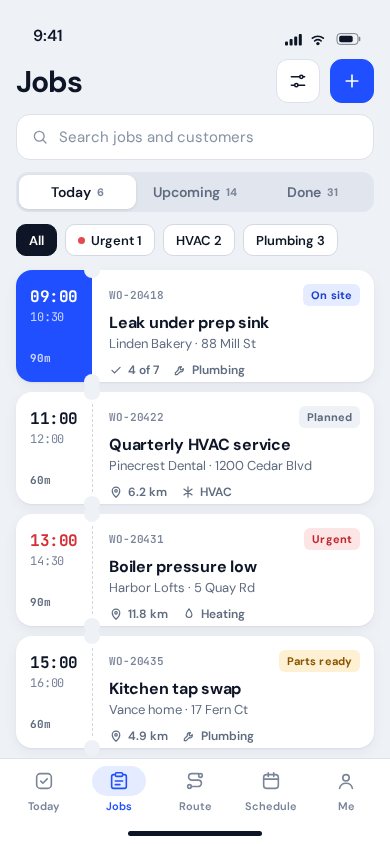
Dispatch is a complete field service app for technicians: welcome and company sign in, a today screen with the day's route spine, jobs, search, a work order ticket, the customer and their equipment, live navigation to the next stop, an on site job clock, a checklist, photo capture with markup, van stock, an invoice, customer sign off and a closed job. Then the week schedule, dispatch messages, performance, a timesheet, follow up jobs, notifications, a team plan, profile and settings. Cool grey, white tickets, deep ink and cobalt.
| Detail | Value |
|---|---|
| Screen type | List |
| App | Dispatch: Field service jobs for technicians |
| Category | Productivity |
| Design language | Enterprise, light |
| Type | DM Sans |
| Colours | #eef1f6 background, #ffffff surface, #0d1526 text, #5f6b7f text-muted, #1f4fff accent, #ffffff accent-contrast, #12a46b secondary, #dde2ea border, #e5484d danger |
What this screen says
- Jobs
- Search jobs and customers
- Today 6 Upcoming 14 Done 31
- All Urgent 1 HVAC 2 Plumbing 3
- 09:0010:30 90m
- WO-20418 On site
- Leak under prep sink
- Linden Bakery · 88 Mill St
- 4 of 7 Plumbing
- 11:0012:00 60m
- WO-20422 Planned
- Quarterly HVAC service
- Pinecrest Dental · 1200 Cedar Blvd
- 6.2 km HVAC
- 13:0014:30 90m
- WO-20431 Urgent
- Boiler pressure low
- Harbor Lofts · 5 Quay Rd
- 11.8 km Heating
- 15:0016:00 60m
- WO-20435 Parts ready
- Kitchen tap swap
- Vance home · 17 Fern Ct
- 4.9 km Plumbing
- Today
- Route
- Schedule
- Me
Around it in Dispatch
More list and feed screens
- Aide Notifications: Executive AI assistant
- Juno Models: AI chat assistant
- Opal Projects: Studio dashboard
- Jot Folders: Quick notes and checklists
- Chrono Alarms: World clock, timers and stopwatch
- Frontdesk Views: Customer support inbox
- Campaigns: Email marketing campaigns
- Outpost Calendar: Schedule social posts
- Pageview Reports: Website analytics
- Polish Documents: Writing assistant and keyboard
- Tapline Links: Link-in-bio pages and analytics
- Quill Pages: Docs, wikis and databases in one workspace
Every productivity app list screen
What makes a good list screen
- Show what people need to decide. Each row should carry just enough to choose: a title, one or two details and a status. Everything else belongs on the detail screen.
- Keep rows consistent. The same information in the same place on every row lets people scan down a column instead of reading each item.
- Group with headings. Dates, categories or status headings break long lists into chunks people can skip through.
- Make common actions quick. Swipe actions, a checkbox or a heart on the row save opening the item for small tasks.
The full list screen guide and every example
Remix Dispatch free: describe your own app and it is drawn in this design. Or get its files from $10: Figma, React Native, SwiftUI, Flutter and HTML.