Templates · Search and explore screens · Productivity app · Aim
Aim Search screen
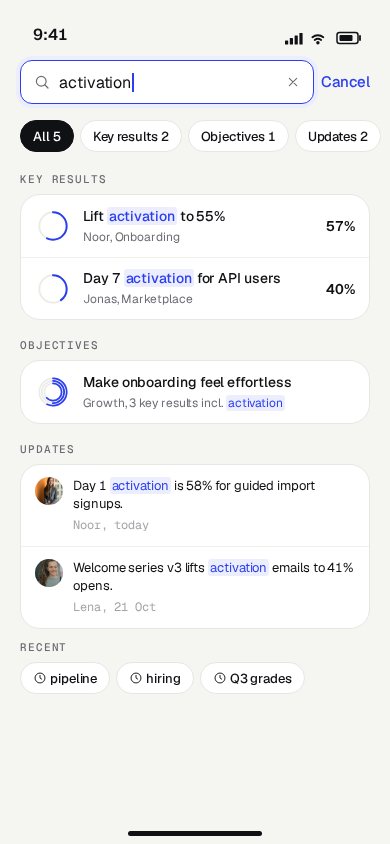
A search screen from Aim, a goals and key results app template in a Minimal style. Screen 16 of 25.
Aim is a complete objectives and key results app: welcome, setup and sign in, a today view with the quarter ruler, objectives and key result pages, a weekly check-in with confidence and a saved screen, new objectives and key results, an alignment tree, insights, team and teammate pages, search, a focus timer, a quarter close with grades, an updates feed, an audio weekly brief, plans, notifications, profile and settings. Paper white and ink with a single cobalt accent and quiet green, amber and red for status.
| Detail | Value |
|---|---|
| Screen type | Search |
| App | Aim: Goals and key results |
| Category | Productivity |
| Design language | Minimal, light |
| Type | Geist Mono for headings, Geist for text |
| Colours | #f5f5f2 background, #ffffff surface, #101114 text, #6c6d73 text-muted, #2b3ff0 accent, #ffffff accent-contrast, #eceefe secondary, #e7e7e2 border, #149e5c success, #d98a00 warning, #e0473f danger |
What this screen says
- activation
- Cancel
- All 5 Key results 2 Objectives 1 Updates 2
- Key results
- Lift activation to 55%
- Noor, Onboarding
- Day 7 activation for API users
- Jonas, Marketplace
- Objectives
- Make onboarding feel effortless
- Growth, 3 key results incl. activation
- Updates
- Day 1 activation is 58% for guided import signups.
- Noor, today
- Welcome series v3 lifts activation emails to 41% opens.
- Lena, 21 Oct
- Recent
- pipeline hiring Q3 grades
Around it in Aim
More search and explore screens
- Inkwell Search: Daily journal
- Shortlist Search: Job search and application tracker
- Parley Search: Team messenger
- Docket Assistant: Task and sprint planner
- Kanso Search: Tasks, calendar and chat
- Margin Search: AI note taking
- Aide Search: Executive AI assistant
- Juno Search: AI chat assistant
- Opal Search: Studio dashboard
- Jot Search: Quick notes and checklists
- Chrono Add city: World clock, timers and stopwatch
- Frontdesk Macros: Customer support inbox
Every productivity app search screen
What makes a good search screen
- Show something before people type. Recent searches, popular items or categories make the empty search screen useful and save typing.
- Suggest as people type. Autocomplete with matching items, not only matching words, lets people jump straight to a result.
- Make filters visible and reversible. Show active filters as chips that can be removed in one tap, and the number of results as filters change.
- Forgive typos. Close matches and "Did you mean" stop a spelling mistake from ending in an empty screen.
The full search screen guide and every example
Remix Aim free: describe your own app and it is drawn in this design. Or get its files from $10: Figma, React Native, SwiftUI, Flutter and HTML.