Templates · Search and explore screens · Productivity app · Frontdesk
Frontdesk Macros screen
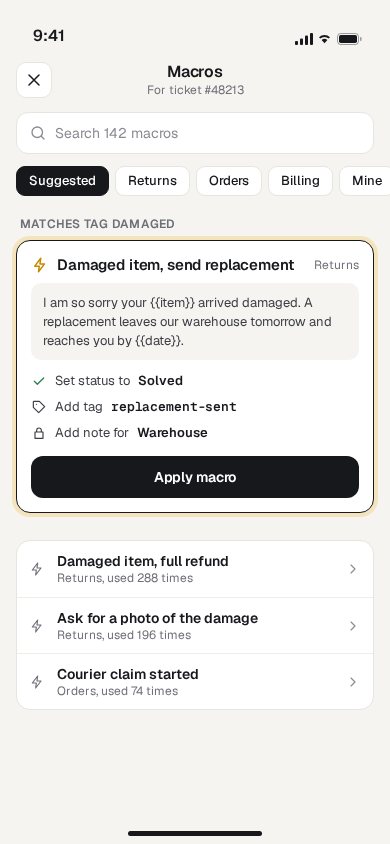
A search screen from Frontdesk, a customer support inbox app template in an Enterprise style. Screen 9 of 25.
Frontdesk is a complete support agent app: welcome, sign in, a home with your queue and tickets at risk, saved views, an inbox sorted by SLA, a ticket thread with internal notes, the customer card, a reply with macros, mentions, assign and tag, a solved screen, live chats with a running conversation, a voice call with a live transcript, search, the customer's order with a partial refund, team performance, satisfaction ratings, the team, notifications, a Pro plan, profile and settings. Warm paper and white with ink and marigold.
| Detail | Value |
|---|---|
| Screen type | Search |
| App | Frontdesk: Customer support inbox |
| Category | Productivity |
| Design language | Enterprise, light |
| Type | Geist |
| Colours | #f5f4f0 background, #ffffff surface, #17181c text, #6e6f78 text-muted, #f4b324 accent, #17181c accent-contrast, #17181c secondary, #e7e5df border, #d93a3a danger |
What this screen says
- Macros
- For ticket #48213
- Search 142 macros
- Suggested Returns Orders Billing Mine
- Matches tag damaged
- Damaged item, send replacementReturns
- I am so sorry your {{item}} arrived damaged. A replacement leaves our warehouse tomorrow and reaches you by {{date}}.
- Set status to Solved
- Add tag replacement-sent
- Add note for Warehouse
- Apply macro
- Damaged item, full refund
- Returns, used 288 times
- Ask for a photo of the damage
- Returns, used 196 times
- Courier claim started
- Orders, used 74 times
Around it in Frontdesk
More search and explore screens
- Parley Search: Team messenger
- Docket Assistant: Task and sprint planner
- Kanso Search: Tasks, calendar and chat
- Margin Search: AI note taking
- Aide Search: Executive AI assistant
- Juno Search: AI chat assistant
- Opal Search: Studio dashboard
- Jot Search: Quick notes and checklists
- Chrono Add city: World clock, timers and stopwatch
- Campaign Audience: Email marketing campaigns
- Outpost Search: Schedule social posts
- Pageview Search: Website analytics
Every productivity app search screen
What makes a good search screen
- Show something before people type. Recent searches, popular items or categories make the empty search screen useful and save typing.
- Suggest as people type. Autocomplete with matching items, not only matching words, lets people jump straight to a result.
- Make filters visible and reversible. Show active filters as chips that can be removed in one tap, and the number of results as filters change.
- Forgive typos. Close matches and "Did you mean" stop a spelling mistake from ending in an empty screen.
The full search screen guide and every example
Remix Frontdesk free: describe your own app and it is drawn in this design. Or get its files from $10: Figma, React Native, SwiftUI, Flutter and HTML.