Templates · Home screens · Finance app · Zentra
Zentra Home screen
A home screen from Zentra, a crypto trading app template in a Dark-first style. Screen 4 of 14.
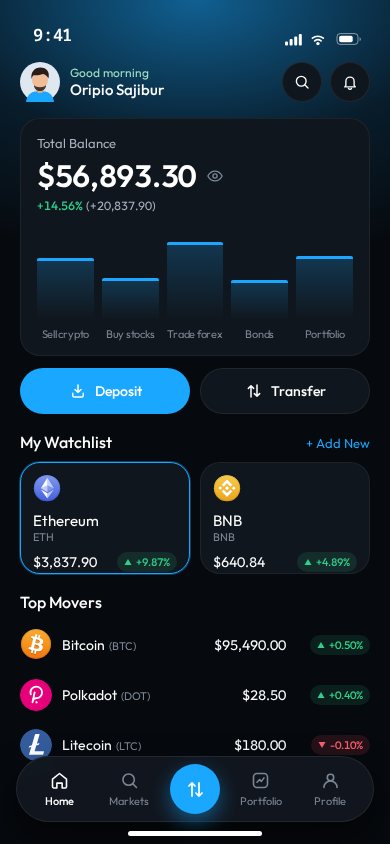
Zentra is a complete crypto app on near-black: onboarding, sign in, passcode, a balance home with a watchlist, markets, a coin chart, swap with a keypad, a receipt, portfolio, deposit, activity, a Pro paywall, profile and settings. One electric blue for every action, green and red only for price moves.
| Detail | Value |
|---|---|
| Screen type | Home |
| App | Zentra: Crypto trading |
| Category | Finance |
| Design language | Dark-first, dark |
| Type | Outfit |
| Colours | #06090d background, #10161d surface, #ffffff text, #8a94a3 text-muted, #19a7ff accent, #ffffff accent-contrast, #1c242d border, #2fd08a success, #ff5d6c danger |
What this screen says
- Good morning
- Oripio Sajibur
- Total Balance
- +14.56% (+20,837.90)
- Sell crypto
- Buy stocks
- Trade forex
- Bonds
- Portfolio
- Deposit
- Transfer
- My Watchlist+ Add New
- Ethereum
- ETH
- BNB
- Top Movers
- Bitcoin(BTC) $95,490.00 +0.50%
- Polkadot(DOT) $28.50 +0.40%
- Litecoin(LTC) $180.00 -0.10%
- Home
- Markets
- Profile
Around it in Zentra
More home screens
- Payly Home: UPI payments, recharges and bills
- Crest Home: Credit card bills and rewards
- Storefront Home: Run your online store
- Bastion Accounts: Everyday banking from a big bank
- Later Home: Buy now, pay in four
- Standing Home: Credit score and reports
- Accrue Home: Retirement and pension planner
- Levy Home: Taxes for freelancers
- Bullion Home: Gold and silver savings
- Wage Home: Get paid as you work
- Keystone Home: Mortgage and home loan tracker
- Rebate Home: Cashback card and rewards
What makes a good home screen
- Put the most important thing first. Decide the one thing most people come for, like today's workout, a balance or the next booking, and give it the top of the screen.
- Make it feel current. Greetings with the time of day, today's date, fresh numbers and recent activity tell people the app is alive and about them.
- Keep quick actions within thumb reach. The two or three things people do most should be one tap away, in the lower part of the screen or a floating button.
- Group related content in clear sections. Use headings and spacing so the screen scans as a few blocks, not a long mixed list.
The full home screen guide and every example
Remix Zentra free: describe your own app and it is drawn in this design. Or get its files from $10: Figma, React Native, SwiftUI, Flutter and HTML.