Templates · Home screens · Sports app · Scoreboard
Scoreboard Scores screen
A home screen from Scoreboard, a sports app template in a Dark-first style. Screen 4 of 25.
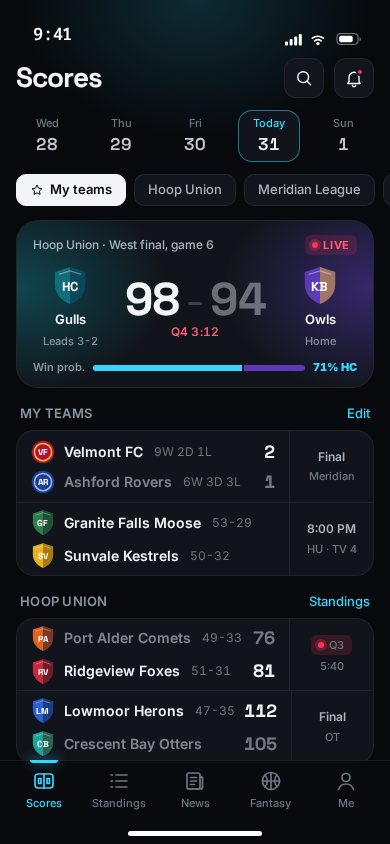
Scoreboard is a complete sports scores app: welcome, pick your teams and sign in, a scores home across six invented leagues with a live game hero, a game cast with a drawn court, win probability and last plays, the full play by play and box score, a highlight player, standings, a team page, a player page with season stats, a schedule, news and an article, search, my teams, score alerts, a fantasy team and a head to head matchup, the Plus plan with checkout and a welcome, notifications, profile and settings. Near black and charcoal with floodlight cyan and a live red.
| Detail | Value |
|---|---|
| Screen type | Home |
| App | Scoreboard: Scores and news for every sport |
| Category | Sports |
| Design language | Dark-first, dark |
| Type | Space Grotesk for headings, Inter for text |
| Colours | #07090c background, #11151b surface, #f2f4f7 text, #8a93a1 text-muted, #34d8ff accent, #03131a accent-contrast, #ff3355 secondary, #1f252e border, #ffb020 warning |
What this screen says
- Scores
- Wed28
- Thu29
- Fri30
- Today31
- Sun1
- My teams Hoop Union Meridian League Gridiron Fed
- Hoop Union · West final, game 6 LIVE
- GullsLeads 3-2
- Q4 3:12
- OwlsHome
- Win prob.
- 71% HC
- MY TEAMSEdit
- Velmont FC9W 2D 1L 2
- Ashford Rovers6W 3D 3L 1
- FinalMeridian
- Granite Falls Moose53-29
- Sunvale Kestrels50-32
- 8:00 PMHU · TV 4
- HOOP UNIONStandings
- Port Alder Comets49-33 76
- Ridgeview Foxes51-31 81
- Q3 5:40
- Lowmoor Herons47-35 112
- Crescent Bay Otters105
- FinalOT
- Standings
- News
- Fantasy
Around it in Scoreboard
More home screens
- Fairway Home: Golf course guide and scorecard
- Matchday Home: Football scores and fantasy
- Rally Home: Tennis and padel club
- Swell Home: Surf forecast
- Pitwall Mission control: Race engineering
- Elevens Home: Fantasy cricket leagues
- Bib Home: Find and enter races
- Wicket Home: Live cricket scores
- Courtside Home: Pickup basketball games
- Tack Home: Sailing wind and regatta tracker
- Frag Home: Esports tournaments and teams
- Canter Home: Riding stables and lessons
What makes a good home screen
- Put the most important thing first. Decide the one thing most people come for, like today's workout, a balance or the next booking, and give it the top of the screen.
- Make it feel current. Greetings with the time of day, today's date, fresh numbers and recent activity tell people the app is alive and about them.
- Keep quick actions within thumb reach. The two or three things people do most should be one tap away, in the lower part of the screen or a floating button.
- Group related content in clear sections. Use headings and spacing so the screen scans as a few blocks, not a long mixed list.
The full home screen guide and every example
Remix Scoreboard free: describe your own app and it is drawn in this design. Or get its files from $10: Figma, React Native, SwiftUI, Flutter and HTML.