Templates · Home screens · Sports app · Matchday
Matchday Home screen
A home screen from Matchday, a football scores and fantasy app template in a Dark-first style. Screen 5 of 25.
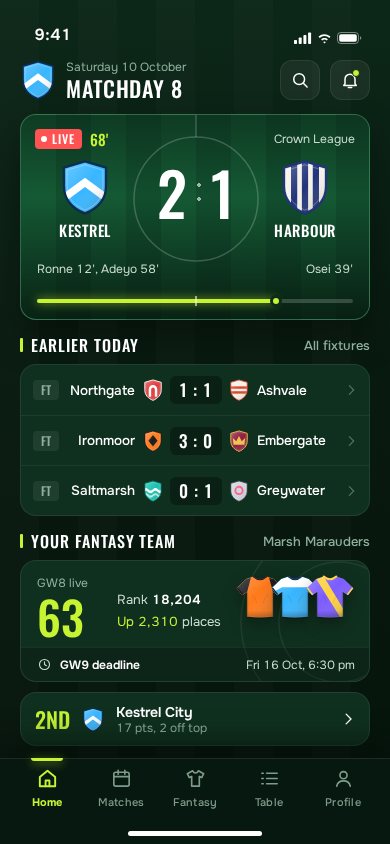
Matchday is a complete football companion with invented clubs: welcome, sign in, picking a club, a matchday home, fixtures, a live match with a goal by goal timeline, lineups on a pitch, match stats, the league table, club and player pages and search. The fantasy side covers your team on a pitch, gameweek points, transfers with a confirm step, the captain pick and mini leagues, plus a Pro plan, notifications, profile and settings.
| Detail | Value |
|---|---|
| Screen type | Home |
| App | Matchday: Football scores and fantasy |
| Category | Sports |
| Design language | Dark-first, dark |
| Type | Onest |
| Colours | #08190f background, #10301f surface, #ffffff text, #8fb09c text-muted, #c6f432 accent, #0b1f0d accent-contrast, #17633a secondary, #1f4631 border, #ff5252 danger |
What this screen says
- Saturday 10 October
- Matchday 8
- Live 68'Crown League
- Kestrel
- Harbour
- Ronne 12', Adeyo 58' Osei 39'
- Earlier today
- All fixtures
- FTNorthgate
- Ashvale
- FTIronmoor
- Embergate
- FTSaltmarsh
- Greywater
- Your fantasy team
- Marsh Marauders
- GW8 live 63
- Rank 18,204 Up 2,310 places
- GW9 deadlineFri 16 Oct, 6:30 pm
- 2nd
- Kestrel City 17 pts, 2 off top
- Home
- Matches
- Fantasy
- Table
- Profile
Around it in Matchday
More home screens
- Canter Home: Riding stables and lessons
- Ollie Home: Skate spots and clips
- Eddy Today: River levels for paddlers
- Whistle Home: Grassroots league manager for coaches
- Oche Home: Darts scorer and leagues
- Cairn Explore: Trails, contours and summits on one map sheet
- Lapse Home: Swim training
- Angler Today: A fishing log drawn on the depth chart
- Piste Home: Ski resort companion
- Crag Home: Climbing gym logbook
- Fairway Home: Golf course guide and scorecard
- Rally Home: Tennis and padel club
What makes a good home screen
- Put the most important thing first. Decide the one thing most people come for, like today's workout, a balance or the next booking, and give it the top of the screen.
- Make it feel current. Greetings with the time of day, today's date, fresh numbers and recent activity tell people the app is alive and about them.
- Keep quick actions within thumb reach. The two or three things people do most should be one tap away, in the lower part of the screen or a floating button.
- Group related content in clear sections. Use headings and spacing so the screen scans as a few blocks, not a long mixed list.
The full home screen guide and every example
Remix Matchday free: describe your own app and it is drawn in this design. Or get its files from $10: Figma, React Native, SwiftUI, Flutter and HTML.