Templates · Home screens · Sports app · Canter
Canter Home screen
A home screen from Canter, a riding stables and lessons app template in a Luxury style. Screen 4 of 25.
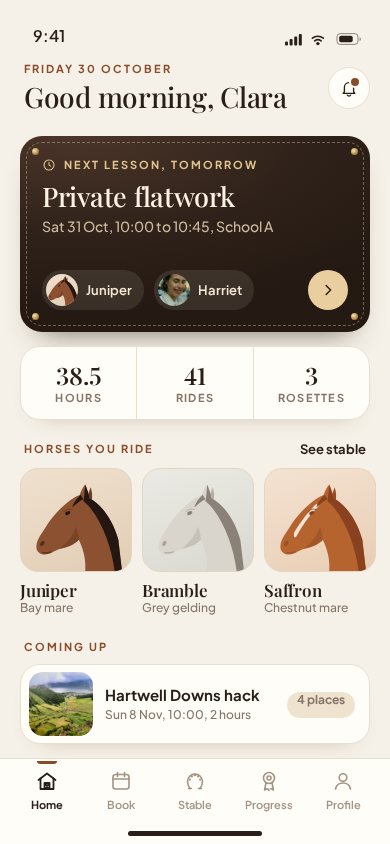
Canter is a complete riding stables app: welcome, rider level and sign in, a home with the next lesson on a stitched leather card, lessons to book, instructors, the stable of horses and a horse profile, a month calendar with time slots, review, payment and a rosette confirmation, a lesson plan drawn on a dressage arena, a live ride with gait tracking, ride summaries, progress, a ride journal and log form, a trail ride, video review, shows and results, membership, notifications, profile and settings. Linen and espresso leather with cognac, brass and rosette blue.
| Detail | Value |
|---|---|
| Screen type | Home |
| App | Canter: Riding stables and lessons |
| Category | Sports |
| Design language | Luxury, light |
| Type | Playfair Display for headings, Plus Jakarta Sans for text |
| Colours | #f6f1e8 background, #fffdf8 surface, #2a1e18 text, #857567 text-muted, #8a4b2a accent, #f6ead6 accent-contrast, #2c4a8c secondary, #e8dfd0 border, #a3322b danger |
What this screen says
- Friday 30 October
- Good morning, Clara
- Next lesson, tomorrow
- Private flatwork
- Sat 31 Oct, 10:00 to 10:45, School A
- Juniper
- Harriet
- 38.5Hours
- 41Rides
- 3Rosettes
- Horses you ride
- See stable
- JuniperBay mare
- BrambleGrey gelding
- SaffronChestnut mare
- Coming up
- Hartwell Downs hackSun 8 Nov, 10:00, 2 hours
- 4 places
- Home
- Book
- Stable
- Progress
- Profile
Around it in Canter
More home screens
- Matchday Home: Football scores and fantasy
- Rally Home: Tennis and padel club
- Swell Home: Surf forecast
- Pitwall Mission control: Race engineering
- Elevens Home: Fantasy cricket leagues
- Scoreboard Scores: Scores and news for every sport
- Bib Home: Find and enter races
- Wicket Home: Live cricket scores
- Courtside Home: Pickup basketball games
- Tack Home: Sailing wind and regatta tracker
- Frag Home: Esports tournaments and teams
- Ollie Home: Skate spots and clips
What makes a good home screen
- Put the most important thing first. Decide the one thing most people come for, like today's workout, a balance or the next booking, and give it the top of the screen.
- Make it feel current. Greetings with the time of day, today's date, fresh numbers and recent activity tell people the app is alive and about them.
- Keep quick actions within thumb reach. The two or three things people do most should be one tap away, in the lower part of the screen or a floating button.
- Group related content in clear sections. Use headings and spacing so the screen scans as a few blocks, not a long mixed list.
The full home screen guide and every example
Remix Canter free: describe your own app and it is drawn in this design. Or get its files from $10: Figma, React Native, SwiftUI, Flutter and HTML.