Templates · Home screens · Sports app · Fairway
Fairway Home screen
A home screen from Fairway, a golf course guide and scorecard app template in a Luxury style. Screen 5 of 25.
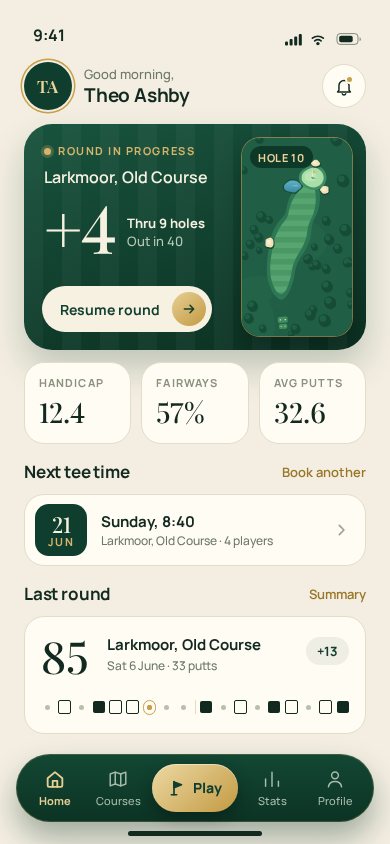
Fairway is a complete golf app: onboarding, sign in, a handicap setup, a home with the round in progress, a course guide with all eighteen hole maps drawn from above, live distances to the pin, shot tracking, club distances, a scorecard with score entry, a round summary, stats and a handicap trend, tee time booking with players and a confirmation, a membership, notifications, profile and settings. Clubhouse cream, deep green and old gold with serif numerals.
| Detail | Value |
|---|---|
| Screen type | Home |
| App | Fairway: Golf course guide and scorecard |
| Category | Sports |
| Design language | Luxury, light |
| Type | Manrope |
| Colours | #f3eee1 background, #fffcf4 surface, #12291f text, #6d7868 text-muted, #0f3d2e accent, #f7f1e1 accent-contrast, #c8a04a secondary, #e4dcc8 border, #b5482f danger |
What this screen says
- TA
- Good morning,
- Theo Ashby
- HOLE 10
- ROUND IN PROGRESS
- Larkmoor, Old Course
- +4Thru 9 holesOut in 40
- Resume round
- HANDICAP 12.4
- FAIRWAYS 57%
- AVG PUTTS 32.6
- Next tee time
- Book another
- 21JUN
- Sunday, 8:40
- Larkmoor, Old Course · 4 players
- Last round
- Summary
- Sat 6 June · 33 putts +13
- Home
- Courses
- Play
- Stats
- Profile
Around it in Fairway
More home screens
- Scoreboard Scores: Scores and news for every sport
- Bib Home: Find and enter races
- Wicket Home: Live cricket scores
- Courtside Home: Pickup basketball games
- Tack Home: Sailing wind and regatta tracker
- Frag Home: Esports tournaments and teams
- Canter Home: Riding stables and lessons
- Ollie Home: Skate spots and clips
- Eddy Today: River levels for paddlers
- Whistle Home: Grassroots league manager for coaches
- Oche Home: Darts scorer and leagues
- Cairn Explore: Trails, contours and summits on one map sheet
What makes a good home screen
- Put the most important thing first. Decide the one thing most people come for, like today's workout, a balance or the next booking, and give it the top of the screen.
- Make it feel current. Greetings with the time of day, today's date, fresh numbers and recent activity tell people the app is alive and about them.
- Keep quick actions within thumb reach. The two or three things people do most should be one tap away, in the lower part of the screen or a floating button.
- Group related content in clear sections. Use headings and spacing so the screen scans as a few blocks, not a long mixed list.
The full home screen guide and every example
Remix Fairway free: describe your own app and it is drawn in this design. Or get its files from $10: Figma, React Native, SwiftUI, Flutter and HTML.