Templates · Home screens · Sports app · Tack
Tack Home screen
A home screen from Tack, a sailing wind and regatta tracker app template in a Minimal style. Screen 4 of 25.
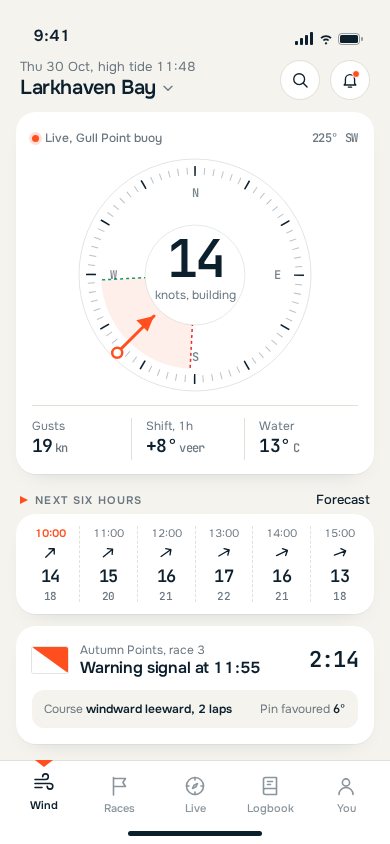
Tack is a complete sailing companion: welcome, boat setup and sign in, a wind home with a live dial and hourly strip, a wind forecast with gust bands and shifts, venue explore and detail with tide, regattas with entry, fee checkout and confirmation, a start sequence with signal flags and line bias, a live race on a course map with tacks drawn, results, race analysis, a logbook with sessions, a season dashboard, boat polars, notifications, a Pro plan, profile and settings. Sailcloth white and navy ink with a spinnaker orange accent.
| Detail | Value |
|---|---|
| Screen type | Home |
| App | Tack: Sailing wind and regatta tracker |
| Category | Sports |
| Design language | Minimal, light |
| Type | JetBrains Mono for headings, Onest for text |
| Colours | #f4f3ee background, #ffffff surface, #0c1f2c text, #6b7780 text-muted, #ff4f1f accent, #ffffff accent-contrast, #1d4f7a secondary, #e2e0d7 border, #e0352b danger |
What this screen says
- Thu 30 Oct, high tide 11:48
- Larkhaven Bay
- Live, Gull Point buoy 225° SW
- 14knots, building
- Gusts19kn
- Shift, 1h+8°veer
- Water13°C
- Next six hours Forecast
- Autumn Points, race 3
- Warning signal at 11:55
- Course windward leeward, 2 laps Pin favoured 6°
- Wind
- Races
- Live
- Logbook
- You
Around it in Tack
More home screens
- Eddy Today: River levels for paddlers
- Whistle Home: Grassroots league manager for coaches
- Oche Home: Darts scorer and leagues
- Cairn Explore: Trails, contours and summits on one map sheet
- Lapse Home: Swim training
- Angler Today: A fishing log drawn on the depth chart
- Piste Home: Ski resort companion
- Crag Home: Climbing gym logbook
- Fairway Home: Golf course guide and scorecard
- Matchday Home: Football scores and fantasy
- Rally Home: Tennis and padel club
- Swell Home: Surf forecast
What makes a good home screen
- Put the most important thing first. Decide the one thing most people come for, like today's workout, a balance or the next booking, and give it the top of the screen.
- Make it feel current. Greetings with the time of day, today's date, fresh numbers and recent activity tell people the app is alive and about them.
- Keep quick actions within thumb reach. The two or three things people do most should be one tap away, in the lower part of the screen or a floating button.
- Group related content in clear sections. Use headings and spacing so the screen scans as a few blocks, not a long mixed list.
The full home screen guide and every example
Remix Tack free: describe your own app and it is drawn in this design. Or get its files from $10: Figma, React Native, SwiftUI, Flutter and HTML.