Templates · Home screens · Sports app · Pitwall
Pitwall Mission control screen
A home screen from Pitwall, a race engineering app template in a Dark-first style. Screen 3 of 24.
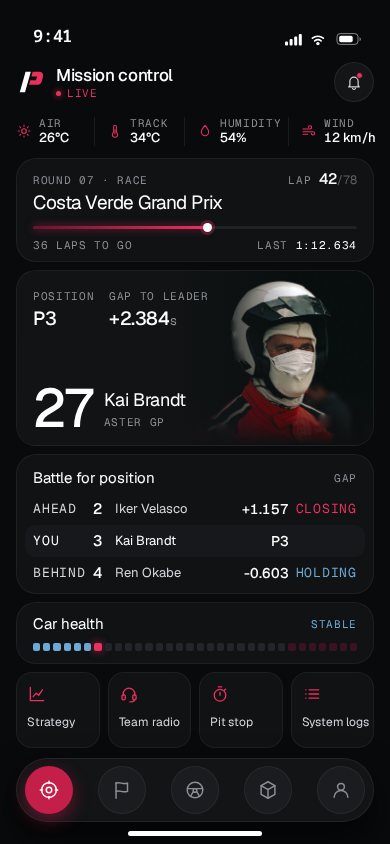
Pitwall is a complete race engineering app on carbon black: onboarding, sign in, a mission control home, a live track map, timing, driver and team radio, strategy and pit stops, a digital twin of the car with tyres, powertrain, brakes and telemetry, system logs and alerts, and a car development lab with simulations and design variables. Crimson for what matters, steel blue for reference data, mono labels throughout.
| Detail | Value |
|---|---|
| Screen type | Home |
| App | Pitwall: Race engineering |
| Category | Sports |
| Design language | Dark-first, dark |
| Type | Geist Mono for headings, Geist for text |
| Colours | #080a0b background, #101214 surface, #ffffff text, #8b9096 text-muted, #c41f48 accent, #ffffff accent-contrast, #6ca9d4 secondary, #1d2023 border, #ff4d6d danger |
What this screen says
- Mission control
- Live
- AIR26°C
- TRACK34°C
- HUMIDITY54%
- WIND12 km/h
- Round 07 · Race Lap 42/78
- Costa Verde Grand Prix
- 36 laps to go Last 1:12.634
- Position
- P3
- Gap to leader
- +2.384s
- Kai Brandt
- Aster GP
- Battle for position Gap
- Ahead 2Iker Velasco +1.157Closing
- You 3Kai Brandt P3
- Behind 4Ren Okabe -0.603Holding
- Car health Stable
- Strategy
- Team radio
- Pit stop
- System logs
Around it in Pitwall
More home screens
- Bib Home: Find and enter races
- Wicket Home: Live cricket scores
- Courtside Home: Pickup basketball games
- Tack Home: Sailing wind and regatta tracker
- Frag Home: Esports tournaments and teams
- Canter Home: Riding stables and lessons
- Ollie Home: Skate spots and clips
- Eddy Today: River levels for paddlers
- Whistle Home: Grassroots league manager for coaches
- Oche Home: Darts scorer and leagues
- Cairn Explore: Trails, contours and summits on one map sheet
- Lapse Home: Swim training
What makes a good home screen
- Put the most important thing first. Decide the one thing most people come for, like today's workout, a balance or the next booking, and give it the top of the screen.
- Make it feel current. Greetings with the time of day, today's date, fresh numbers and recent activity tell people the app is alive and about them.
- Keep quick actions within thumb reach. The two or three things people do most should be one tap away, in the lower part of the screen or a floating button.
- Group related content in clear sections. Use headings and spacing so the screen scans as a few blocks, not a long mixed list.
The full home screen guide and every example
Remix Pitwall free: describe your own app and it is drawn in this design. Or get its files from $10: Figma, React Native, SwiftUI, Flutter and HTML.