Templates · Home screens · Sports app · Bib
Bib Home screen
A home screen from Bib, a find and enter races app template in a Neubrutalism style. Screen 4 of 25.
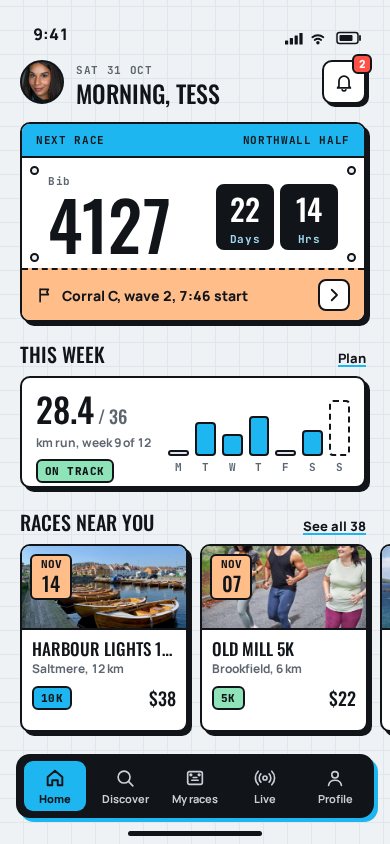
Bib is a complete race app for runners: welcome, race goals and sign in, a home with the next race bib and countdown, discover with distance and date filters, a race calendar, race pages with a drawn course map and elevation, choosing an event and corral, runner details, checkout and a confirmation, a digital bib with corral, wave and start time, my races, a training countdown, a race day plan, live athlete tracking with splits, results, a personal result, a finisher certificate, notifications, a Plus plan, profile and settings. Chalk, ink, hi-vis cyan and peach.
| Detail | Value |
|---|---|
| Screen type | Home |
| App | Bib: Find and enter races |
| Category | Sports |
| Design language | Neubrutalism, light |
| Type | Oswald for headings, Manrope for text |
| Colours | #eef2f5 background, #ffffff surface, #111418 text, #5d6670 text-muted, #1eb6f0 accent, #111418 accent-contrast, #ffbd8a secondary, #111418 border, #ff5146 danger |
What this screen says
- Sat 31 Oct
- Morning, Tess
- Next race Northwall Half
- Bib4127
- 22Days
- 14Hrs
- Corral C, wave 2, 7:46 start
- This week
- Plan
- km run, week 9 of 12
- On track
- Races near you
- See all 38
- Nov 14
- Harbour Lights 10K
- Saltmere, 12 km
- 10K $38
- Nov 07
- Old Mill 5K
- Brookfield, 6 km
- 5K $22
- Nov 28
- Dunmore Cliffs 15K
- Dunmore, 64 km
- 15K $46
- Home
- Discover
- My races
- Live
- Profile
Around it in Bib
More home screens
- Cairn Explore: Trails, contours and summits on one map sheet
- Lapse Home: Swim training
- Angler Today: A fishing log drawn on the depth chart
- Piste Home: Ski resort companion
- Crag Home: Climbing gym logbook
- Fairway Home: Golf course guide and scorecard
- Matchday Home: Football scores and fantasy
- Rally Home: Tennis and padel club
- Swell Home: Surf forecast
- Pitwall Mission control: Race engineering
- Elevens Home: Fantasy cricket leagues
- Scoreboard Scores: Scores and news for every sport
What makes a good home screen
- Put the most important thing first. Decide the one thing most people come for, like today's workout, a balance or the next booking, and give it the top of the screen.
- Make it feel current. Greetings with the time of day, today's date, fresh numbers and recent activity tell people the app is alive and about them.
- Keep quick actions within thumb reach. The two or three things people do most should be one tap away, in the lower part of the screen or a floating button.
- Group related content in clear sections. Use headings and spacing so the screen scans as a few blocks, not a long mixed list.
The full home screen guide and every example
Remix Bib free: describe your own app and it is drawn in this design. Or get its files from $10: Figma, React Native, SwiftUI, Flutter and HTML.