Templates · Home screens · Sports app · Wicket
Wicket Home screen
A home screen from Wicket, a live cricket scores app template in a Dark-first style. Screen 4 of 25.
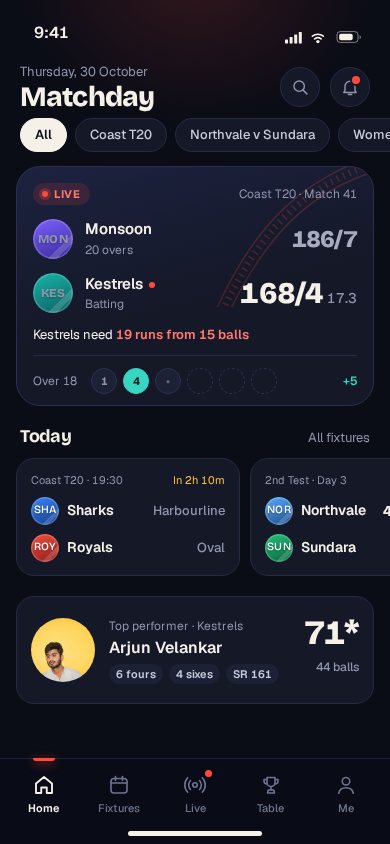
Wicket is a complete live cricket app: welcome, picking teams, sign in, a matchday home, a live scoreboard with the over strip and win probability, ball by ball commentary, the full scorecard, wagon wheel and pitch map, match stats, player and team pages, a venue, highlights, fixtures, the points table, search, match predictions, alerts, tickets with a seat map, checkout and a booked ticket, notifications, a Pro plan, profile and settings. Night navy with ball leather red, aqua and gold.
| Detail | Value |
|---|---|
| Screen type | Home |
| App | Wicket: Live cricket scores |
| Category | Sports |
| Design language | Dark-first, dark |
| Type | Bricolage Grotesque for headings, Geist for text |
| Colours | #0a0c16 background, #141827 surface, #f5f1e8 text, #8f95ad text-muted, #ff4a3d accent, #ffffff accent-contrast, #36d6c3 secondary, #252b45 border, #ffc23d highlight |
What this screen says
- Thursday, 30 October
- Matchday
- All Coast T20 Northvale v Sundara Women's Cup
- Live Coast T20 · Match 41
- MON
- Monsoon
- 20 overs
- KES
- Kestrels
- Batting
- Kestrels need 19 runs from 15 balls
- Over 18 1 4 • +5
- Today
- All fixtures
- Coast T20 · 19:30 In 2h 10m
- SHA SharksHarbourline
- ROY RoyalsOval
- 2nd Test · Day 3 Stumps
- NOR Northvale412 & 96/2
- SUN Sundara366
- Top performer · Kestrels
- Arjun Velankar
- 6 fours4 sixesSR 161
- 71*44 balls
- Home
- Fixtures
- Live
- Table
- Me
Around it in Wicket
More home screens
- Pitwall Mission control: Race engineering
- Elevens Home: Fantasy cricket leagues
- Scoreboard Scores: Scores and news for every sport
- Bib Home: Find and enter races
- Courtside Home: Pickup basketball games
- Tack Home: Sailing wind and regatta tracker
- Frag Home: Esports tournaments and teams
- Canter Home: Riding stables and lessons
- Ollie Home: Skate spots and clips
- Eddy Today: River levels for paddlers
- Whistle Home: Grassroots league manager for coaches
- Oche Home: Darts scorer and leagues
What makes a good home screen
- Put the most important thing first. Decide the one thing most people come for, like today's workout, a balance or the next booking, and give it the top of the screen.
- Make it feel current. Greetings with the time of day, today's date, fresh numbers and recent activity tell people the app is alive and about them.
- Keep quick actions within thumb reach. The two or three things people do most should be one tap away, in the lower part of the screen or a floating button.
- Group related content in clear sections. Use headings and spacing so the screen scans as a few blocks, not a long mixed list.
The full home screen guide and every example
Remix Wicket free: describe your own app and it is drawn in this design. Or get its files from $10: Figma, React Native, SwiftUI, Flutter and HTML.