Templates · Form and input screens · Productivity app · Frontdesk
Frontdesk Internal note screen
A form screen from Frontdesk, a customer support inbox app template in an Enterprise style. Screen 10 of 25.
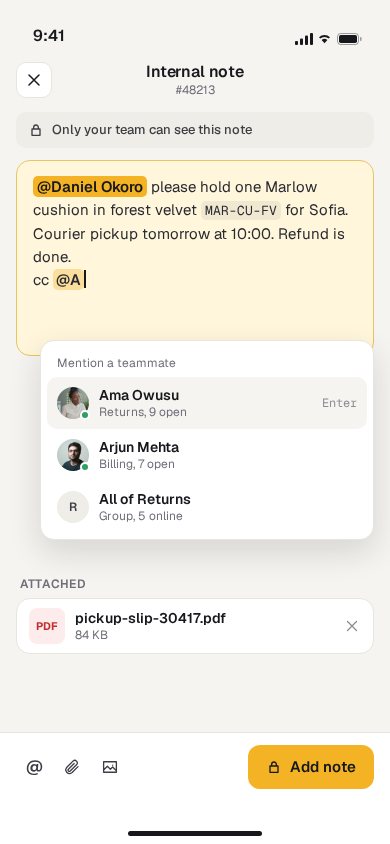
Frontdesk is a complete support agent app: welcome, sign in, a home with your queue and tickets at risk, saved views, an inbox sorted by SLA, a ticket thread with internal notes, the customer card, a reply with macros, mentions, assign and tag, a solved screen, live chats with a running conversation, a voice call with a live transcript, search, the customer's order with a partial refund, team performance, satisfaction ratings, the team, notifications, a Pro plan, profile and settings. Warm paper and white with ink and marigold.
| Detail | Value |
|---|---|
| Screen type | Form |
| App | Frontdesk: Customer support inbox |
| Category | Productivity |
| Design language | Enterprise, light |
| Type | Geist |
| Colours | #f5f4f0 background, #ffffff surface, #17181c text, #6e6f78 text-muted, #f4b324 accent, #17181c accent-contrast, #17181c secondary, #e7e5df border, #d93a3a danger |
What this screen says
- Internal note
- #48213
- Only your team can see this note
- @Daniel Okoro please hold one Marlow cushion in forest velvet MAR-CU-FV for Sofia. Courier pickup tomorrow at 10:00....
- cc @A
- Mention a teammate
- Ama Owusu
- Returns, 9 open
- Enter
- Arjun Mehta
- Billing, 7 open
- All of Returns
- Group, 5 online
- Attached
- pickup-slip-30417.pdf
- 84 KB
- Add note
Around it in Frontdesk
More form and input screens
- Deskly Book a desk: Hybrid office booking
- Pomo New session: Focus timer
- Postbox Compose: Email for busy teams
- Daybook New event: Calendar and planner
- Scanly Sign: Document scanner
- Keyring New item: Password manager
- Rota Swap shift: Shift scheduling for hourly teams
- Inkwell Write: Daily journal
- Shortlist Filters: Job search and application tracker
- Parley Create group: Team messenger
- Docket New task: Task and sprint planner
- Kanso New task: Tasks, calendar and chat
Every productivity app form screen
What makes a good form screen
- Ask only what you need. Every field is a reason to stop. Remove optional fields or move them to later.
- Labels above fields. Visible labels stay readable while people type; placeholder-only labels disappear.
- Use the right keyboard and input. Number pads for amounts, email keyboards for email, pickers for dates and autofill for addresses and codes.
- Validate as people go. Show problems next to the field when people leave it, in words that say how to fix them.
The full form screen guide and every example
Remix Frontdesk free: describe your own app and it is drawn in this design. Or get its files from $10: Figma, React Native, SwiftUI, Flutter and HTML.