Templates · Home screens · Education app · Encore
Encore Feed screen
A home screen from Encore, a creator courses app template in a Dark-first style. Screen 5 of 25.
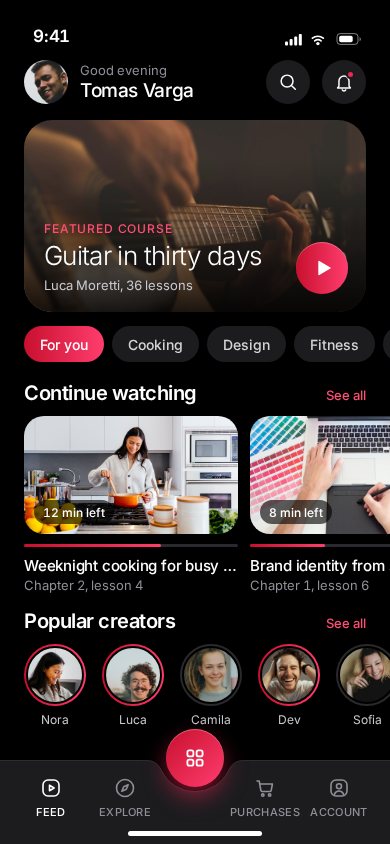
Encore is a complete creator course marketplace: welcome, sign in, a verification code, interests, a feed with a featured course and continue watching, explore, search, categories, a course page with chapters, the lesson player, reviews, creators and creator profiles, subscription plans, checkout, a confirmation, my courses, downloads, a saved list, learning progress, a certificate, purchases, account and settings. Pure black with a single crimson to pink gradient and plenty of photography.
| Detail | Value |
|---|---|
| Screen type | Home |
| App | Encore: Creator courses |
| Category | Education |
| Design language | Dark-first, dark |
| Type | Inter |
| Colours | #000000 background, #1a1a1c surface, #ffffff text, #8f8f97 text-muted, #ee2752 accent, #ffffff accent-contrast, #3a3a3e secondary, #2a2a2e border, #ff5a4d danger |
What this screen says
- Good evening
- Tomas Varga
- Featured course
- Guitar in thirty days
- Luca Moretti, 36 lessons
- For you Cooking Design Fitness Music
- Continue watching
- See all
- 12 min left
- Weeknight cooking for busy people
- Chapter 2, lesson 4
- 8 min left
- Brand identity from scratch
- Chapter 1, lesson 6
- Popular creators
- Nora
- Luca
- Camila
- Dev
- Sofia
- Feed
- Explore
- Purchases
- Account
Around it in Encore
More home screens
- Quanta Home: Interactive physics lessons
- Cram Home: Exam prep and mock tests
- Quad Today: University campus app
- Palm Home: Learn sign language
- Epoch Today: History on a timeline
- Wren Home: Early reading for kids
- Proof Home: Maths tutor that shows its working
- Skim Today: Speed reading trainer
- Terra Home: Geography and flags quiz
- Gambit Home: Chess training
- Buzzer Home: Live trivia
- Homeroom Home: School, all on one page
Every education app home screen
What makes a good home screen
- Put the most important thing first. Decide the one thing most people come for, like today's workout, a balance or the next booking, and give it the top of the screen.
- Make it feel current. Greetings with the time of day, today's date, fresh numbers and recent activity tell people the app is alive and about them.
- Keep quick actions within thumb reach. The two or three things people do most should be one tap away, in the lower part of the screen or a floating button.
- Group related content in clear sections. Use headings and spacing so the screen scans as a few blocks, not a long mixed list.
The full home screen guide and every example
Remix Encore free: describe your own app and it is drawn in this design. Or get its files from $10: Figma, React Native, SwiftUI, Flutter and HTML.