Templates · Settings screens · Smart home app · Couch
Couch Settings screen
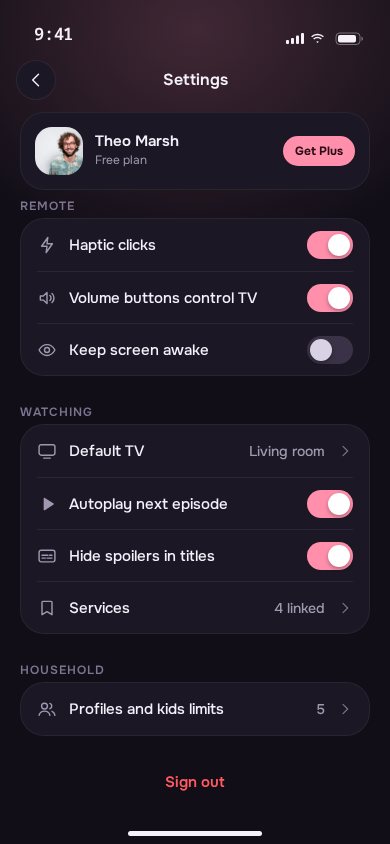
A settings screen from Couch, a smart home app template in a Dark-first style. Screen 25 of 25.
Couch is a complete TV companion: welcome, picking your services, sign in, a home with the TV you are connected to, continue watching and picks across services, a title page with where to watch, episodes, prices to stream, rent or buy, renting a film with a confirmation, search, browse by mood, one watchlist, a live channel guide and a live match, a device picker, a d-pad remote, a trackpad, typing on the TV, a casting screen, your watching week with cost per hour, family profiles, a profile, Couch Plus, notifications and settings. Deep aubergine with velvet rose and butter yellow.
| Detail | Value |
|---|---|
| Screen type | Settings |
| App | Couch: TV remote, casting and watchlist |
| Category | Smart home |
| Design language | Dark-first, dark |
| Type | Bricolage Grotesque for headings, Onest for text |
| Colours | #110e17 background, #1b1724 surface, #f5f0fa text, #a198b0 text-muted, #ff8fab accent, #2a0b16 accent-contrast, #ffd27a secondary, #2b2538 border, #ff5a5f danger |
What this screen says
- Settings
- Theo MarshFree plan
- Get Plus
- Remote
- Haptic clicks
- Volume buttons control TV
- Keep screen awake
- Watching
- Default TV Living room
- Autoplay next episode
- Hide spoilers in titles
- Services 4 linked
- Household
- Profiles and kids limits 5
- Sign out
Around it in Couch
More settings screens
- Sundial Settings: Solar panels and home battery
- Puddle Settings: Garden watering and sprinklers
- Upkeep Settings: Home maintenance calendar
- Kelvin Settings: Climate and thermostat
- Glow Settings: Light scenes and colour
- Tagged Settings: Home inventory for insurance
- Lobby Settings: Apartment building app
- Sweep Settings: Robot vacuum and mop
- Dusk Settings: Smart home scenarios
- Lumen Settings: Smart home energy
- Abode Settings: Smart home devices
- Boxed Settings: Book movers and plan moving day
Every smart home app settings screen
What makes a good settings screen
- Group options into clear sections. Account, notifications, privacy, appearance and help, with headings, so people scan to the right group.
- Label settings by their effect. "Daily reminder at 8:00" is clearer than "Reminders". Add a short description under options that need one.
- Use the right control. Toggles for on and off, a row that opens a list for choices, and sliders only for ranges.
- Apply changes immediately. Most mobile settings take effect when changed, with no Save button to forget.
The full settings screen guide and every example
Remix Couch free: describe your own app and it is drawn in this design. Or get its files from $10: Figma, React Native, SwiftUI, Flutter and HTML.