Templates · Settings screens · Smart home app · Upkeep
Upkeep Settings screen
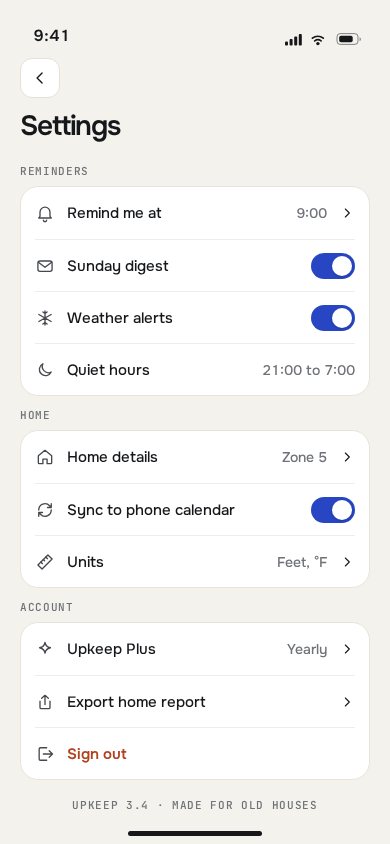
A settings screen from Upkeep, a home maintenance calendar app template in a Minimal style. Screen 25 of 25.
Upkeep is a complete home maintenance app: welcome, home setup and sign in, a today screen with the overdue task and the next two weeks, a month calendar, task details with a step by step guide, logging a task and its confirmation, new recurring tasks, a blueprint floor plan with pinned tasks, rooms, equipment with lifespans, an appliance page, a rating label scanner, finding, booking and confirming a local pro, costs, a home log, notifications, Upkeep Plus, profile and settings. Stone and white with cobalt blueprint drawings, ochre for soon and brick for late.
| Detail | Value |
|---|---|
| Screen type | Settings |
| App | Upkeep: Home maintenance calendar |
| Category | Smart home |
| Design language | Minimal, light |
| Type | Onest |
| Colours | #f3f2ed background, #ffffff surface, #15171a text, #6f7277 text-muted, #2846c4 accent, #ffffff accent-contrast, #c98a1b secondary, #e6e4dc border, #c9502c danger |
What this screen says
- Settings
- Reminders
- Remind me at 9:00
- Sunday digest
- Weather alerts
- Quiet hours 21:00 to 7:00
- Home
- Home details Zone 5
- Sync to phone calendar
- Units Feet, °F
- Account
- Upkeep Plus Yearly
- Export home report
- Sign out
- Upkeep 3.4 · Made for old houses
Around it in Upkeep
More settings screens
- Couch Settings: TV remote, casting and watchlist
- Chime Settings: Voice assistant and smart speaker
- Latch Auto-lock: Smart locks and guest access
- Mesh Settings: Home Wi-Fi network
- Decibel System: Multi-room speakers
- Nursery Alerts: Baby monitor camera and sleep
- Porch Camera settings: Home security cameras
- Sundial Settings: Solar panels and home battery
- Puddle Settings: Garden watering and sprinklers
- Kelvin Settings: Climate and thermostat
- Glow Settings: Light scenes and colour
- Tagged Settings: Home inventory for insurance
Every smart home app settings screen
What makes a good settings screen
- Group options into clear sections. Account, notifications, privacy, appearance and help, with headings, so people scan to the right group.
- Label settings by their effect. "Daily reminder at 8:00" is clearer than "Reminders". Add a short description under options that need one.
- Use the right control. Toggles for on and off, a row that opens a list for choices, and sliders only for ranges.
- Apply changes immediately. Most mobile settings take effect when changed, with no Save button to forget.
The full settings screen guide and every example
Remix Upkeep free: describe your own app and it is drawn in this design. Or get its files from $10: Figma, React Native, SwiftUI, Flutter and HTML.