Templates · Settings screens · Smart home app · Dusk
Dusk Settings screen
A settings screen from Dusk, a smart home scenarios app template in a Glass style. Screen 25 of 25.
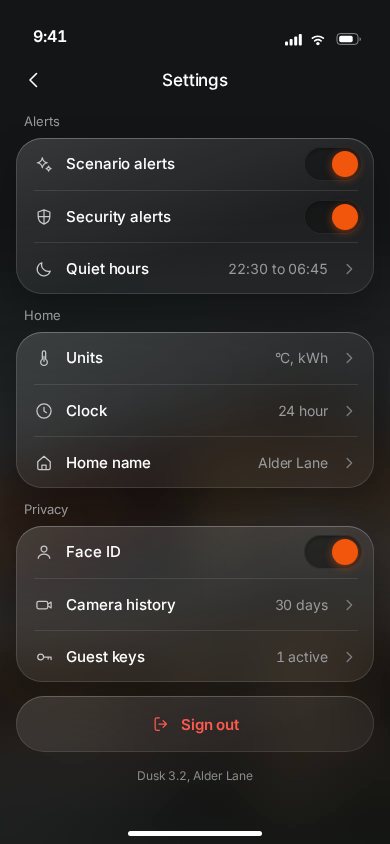
Dusk is a complete smart home app where scenarios do the work: night mode, movie night and away set rooms, devices, climate and security together in one tap. It covers onboarding, sign in, a home with a scenario carousel, a scenario builder, rooms, lights, climate, pairing a device, security and cameras, schedules, energy, a Plus plan, household, profile and settings.
| Detail | Value |
|---|---|
| Screen type | Settings |
| App | Dusk: Smart home scenarios |
| Category | Smart home |
| Design language | Glass, dark |
| Type | Inter |
| Colours | #141516 background, #26272a surface, #ffffff text, #9a9b9e text-muted, #f2560d accent, #ffffff accent-contrast, #3ad07c secondary, #3a3b3e border, #ff5a4f danger |
What this screen says
- Settings
- Alerts
- Scenario alerts
- Security alerts
- Quiet hours
- 22:30 to 06:45
- Home
- Units
- °C, kWh
- Clock
- 24 hour
- Home name
- Alder Lane
- Privacy
- Face ID
- Camera history
- 30 days
- Guest keys
- 1 active
- Sign out
- Dusk 3.2, Alder Lane
Around it in Dusk
More settings screens
- Sweep Settings: Robot vacuum and mop
- Lumen Settings: Smart home energy
- Abode Settings: Smart home devices
- Boxed Settings: Book movers and plan moving day
- Meter Settings: Your energy supplier account
- Couch Settings: TV remote, casting and watchlist
- Chime Settings: Voice assistant and smart speaker
- Latch Auto-lock: Smart locks and guest access
- Mesh Settings: Home Wi-Fi network
- Decibel System: Multi-room speakers
- Nursery Alerts: Baby monitor camera and sleep
- Porch Camera settings: Home security cameras
Every smart home app settings screen
What makes a good settings screen
- Group options into clear sections. Account, notifications, privacy, appearance and help, with headings, so people scan to the right group.
- Label settings by their effect. "Daily reminder at 8:00" is clearer than "Reminders". Add a short description under options that need one.
- Use the right control. Toggles for on and off, a row that opens a list for choices, and sliders only for ranges.
- Apply changes immediately. Most mobile settings take effect when changed, with no Save button to forget.
The full settings screen guide and every example
Remix Dusk free: describe your own app and it is drawn in this design. Or get its files from $10: Figma, React Native, SwiftUI, Flutter and HTML.