Templates · Settings screens · Smart home app · Boxed
Boxed Settings screen
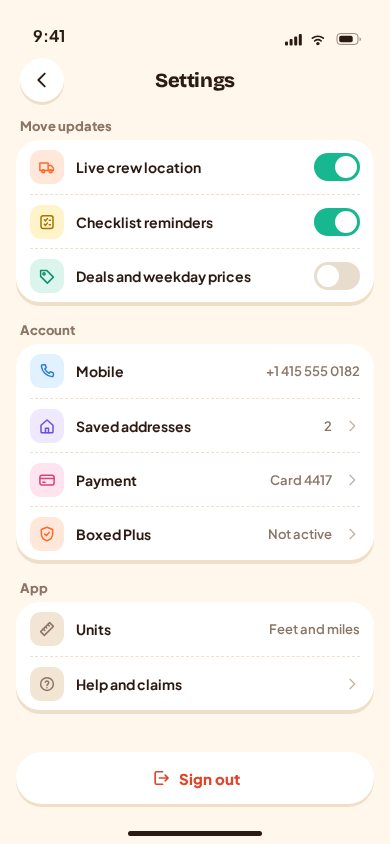
A settings screen from Boxed, a smart home app template in a Playful style. Screen 25 of 25.
Boxed is a complete moving app: welcome, sign in with a texted code, a home with the move day countdown, crew and checklist, move details with both addresses, an inventory by room with a truck fill meter, a room with item steppers and box counts, add item, pick a van, pick a crew, a mover profile, a fixed price quote, a calendar with daily prices, review and pay, a booked ticket, a countdown checklist, packing progress, live move tracking on a map, chat with the crew, a supplies shop and box kit, rate and tip the crew, a Plus cover plan, notifications, profile and settings. Cream and kraft with tomato orange, sunny yellow and mint.
| Detail | Value |
|---|---|
| Screen type | Settings |
| App | Boxed: Book movers and plan moving day |
| Category | Smart home |
| Design language | Playful, light |
| Type | Bricolage Grotesque for headings, Plus Jakarta Sans for text |
| Colours | #fff7ec background, #ffffff surface, #2b1a12 text, #8a7566 text-muted, #ff6a2b accent, #ffffff accent-contrast, #e9b77a secondary, #f0dfc8 border, #e0452a danger |
What this screen says
- Settings
- Move updates
- Live crew location
- Checklist reminders
- Deals and weekday prices
- Account
- Mobile +1 415 555 0182
- Saved addresses 2
- Payment Card 4417
- Boxed Plus Not active
- App
- Units Feet and miles
- Help and claims
- Sign out
Around it in Boxed
More settings screens
- Nursery Alerts: Baby monitor camera and sleep
- Porch Camera settings: Home security cameras
- Sundial Settings: Solar panels and home battery
- Puddle Settings: Garden watering and sprinklers
- Upkeep Settings: Home maintenance calendar
- Kelvin Settings: Climate and thermostat
- Glow Settings: Light scenes and colour
- Tagged Settings: Home inventory for insurance
- Lobby Settings: Apartment building app
- Sweep Settings: Robot vacuum and mop
- Dusk Settings: Smart home scenarios
- Lumen Settings: Smart home energy
Every smart home app settings screen
What makes a good settings screen
- Group options into clear sections. Account, notifications, privacy, appearance and help, with headings, so people scan to the right group.
- Label settings by their effect. "Daily reminder at 8:00" is clearer than "Reminders". Add a short description under options that need one.
- Use the right control. Toggles for on and off, a row that opens a list for choices, and sliders only for ranges.
- Apply changes immediately. Most mobile settings take effect when changed, with no Save button to forget.
The full settings screen guide and every example
Remix Boxed free: describe your own app and it is drawn in this design. Or get its files from $10: Figma, React Native, SwiftUI, Flutter and HTML.