Templates · Settings screens · Smart home app · Puddle
Puddle Settings screen
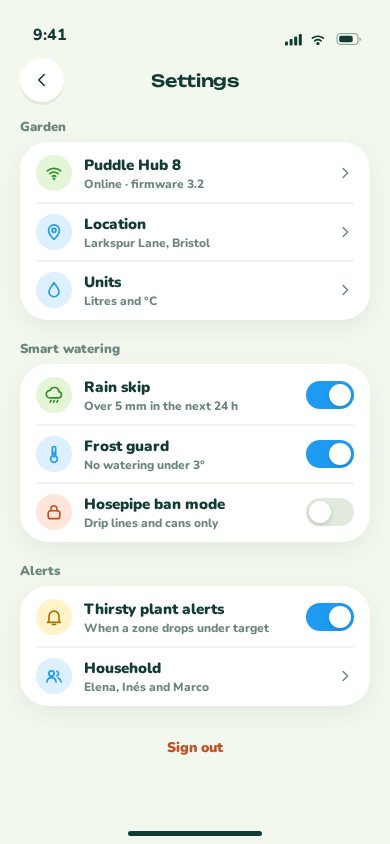
A settings screen from Puddle, a garden watering and sprinklers app template in a Playful style. Screen 25 of 25.
Puddle is a complete smart sprinkler and garden watering app: welcome, pairing the controller, sign in, a garden home with every zone as a droplet gauge, zones and a zone page with soil moisture, a live watering run, a done screen, schedules and a schedule editor, adding a zone, a rain skip weather forecast, water usage, a plant library and plant care page, a drawn garden map, a camera plant check, a shop with a product, basket and order placed, notifications, a Plus plan, profile and settings. Sprout green and white with pond blue water, leaf green, sun yellow and clay.
| Detail | Value |
|---|---|
| Screen type | Settings |
| App | Puddle: Garden watering and sprinklers |
| Category | Smart home |
| Design language | Playful, light |
| Type | Unbounded for headings, Nunito for text |
| Colours | #f3f8ee background, #ffffff surface, #123b34 text, #6b867d text-muted, #1e9bf0 accent, #ffffff accent-contrast, #5cc23a secondary, #e1eadc border, #f0784a danger |
What this screen says
- Settings
- Garden
- Puddle Hub 8Online · firmware 3.2
- LocationLarkspur Lane, Bristol
- UnitsLitres and °C
- Smart watering
- Rain skipOver 5 mm in the next 24 h
- Frost guardNo watering under 3°
- Hosepipe ban modeDrip lines and cans only
- Alerts
- Thirsty plant alertsWhen a zone drops under target
- HouseholdElena, Inés and Marco
- Sign out
Around it in Puddle
More settings screens
- Upkeep Settings: Home maintenance calendar
- Kelvin Settings: Climate and thermostat
- Glow Settings: Light scenes and colour
- Tagged Settings: Home inventory for insurance
- Lobby Settings: Apartment building app
- Sweep Settings: Robot vacuum and mop
- Dusk Settings: Smart home scenarios
- Lumen Settings: Smart home energy
- Abode Settings: Smart home devices
- Boxed Settings: Book movers and plan moving day
- Meter Settings: Your energy supplier account
- Couch Settings: TV remote, casting and watchlist
Every smart home app settings screen
What makes a good settings screen
- Group options into clear sections. Account, notifications, privacy, appearance and help, with headings, so people scan to the right group.
- Label settings by their effect. "Daily reminder at 8:00" is clearer than "Reminders". Add a short description under options that need one.
- Use the right control. Toggles for on and off, a row that opens a list for choices, and sliders only for ranges.
- Apply changes immediately. Most mobile settings take effect when changed, with no Save button to forget.
The full settings screen guide and every example
Remix Puddle free: describe your own app and it is drawn in this design. Or get its files from $10: Figma, React Native, SwiftUI, Flutter and HTML.