Templates · Settings screens · Smart home app · Abode
Abode Settings screen
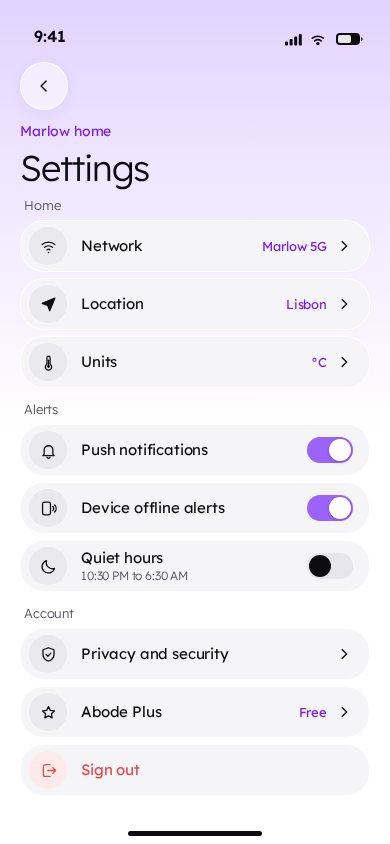
A settings screen from Abode, a smart home devices app template in a Minimal style. Screen 25 of 25.
Abode is a complete smart home app centred on devices: welcome, sign in and a code, a home with the weather, what is playing, quick access and favourite scenes, every device by room, detailed controls for the air conditioner, TV, speaker, robot vacuum, lights and blinds, timers, pairing a new device, scenes you can build and run, a weekly schedule, energy use, a plan, profile and settings. White and pale grey with a lilac wash, electric violet and black.
| Detail | Value |
|---|---|
| Screen type | Settings |
| App | Abode: Smart home devices |
| Category | Smart home |
| Design language | Minimal, light |
| Type | Lexend |
| Colours | #ffffff background, #f5f5f7 surface, #0c0c10 text, #74747f text-muted, #7a1cf5 accent, #ffffff accent-contrast, #ece2ff secondary, #e9e9ee border, #e5484d danger |
What this screen says
- Marlow home
- Settings
- Home
- Network
- Marlow 5G
- Location
- Lisbon
- Units
- °C
- Alerts
- Push notifications
- Device offline alerts
- Quiet hours
- 10:30 PM to 6:30 AM
- Account
- Privacy and security
- Abode Plus
- Free
- Sign out
Around it in Abode
More settings screens
- Couch Settings: TV remote, casting and watchlist
- Chime Settings: Voice assistant and smart speaker
- Latch Auto-lock: Smart locks and guest access
- Mesh Settings: Home Wi-Fi network
- Decibel System: Multi-room speakers
- Nursery Alerts: Baby monitor camera and sleep
- Porch Camera settings: Home security cameras
- Sundial Settings: Solar panels and home battery
- Puddle Settings: Garden watering and sprinklers
- Upkeep Settings: Home maintenance calendar
- Kelvin Settings: Climate and thermostat
- Glow Settings: Light scenes and colour
Every smart home app settings screen
What makes a good settings screen
- Group options into clear sections. Account, notifications, privacy, appearance and help, with headings, so people scan to the right group.
- Label settings by their effect. "Daily reminder at 8:00" is clearer than "Reminders". Add a short description under options that need one.
- Use the right control. Toggles for on and off, a row that opens a list for choices, and sliders only for ranges.
- Apply changes immediately. Most mobile settings take effect when changed, with no Save button to forget.
The full settings screen guide and every example
Remix Abode free: describe your own app and it is drawn in this design. Or get its files from $10: Figma, React Native, SwiftUI, Flutter and HTML.