Templates · Figma templates · Smart home · Couch
Couch Figma template: smart home app UI kit
Couch is a smart home app design in a Dark-first style, and its Figma file holds all 25 screens as real, editable layers: frames you can resize, text you can rewrite, and the palette and type saved as styles. A complete TV companion: welcome, picking your services, sign in, a home with the TV you are connected to, continue watching and picks across services, a title page with where to watch, episodes, prices to stream, rent or buy, renting a film with a confirmation, search, browse by mood, one watchlist, a live channel guide and a live match, a device picker, a d-pad remote, a trackpad, typing on the TV, a casting screen, your watching week with cost per hour, family profiles, a profile, Couch Plus, notifications and settings. Deep aubergine with velvet rose and butter yellow.
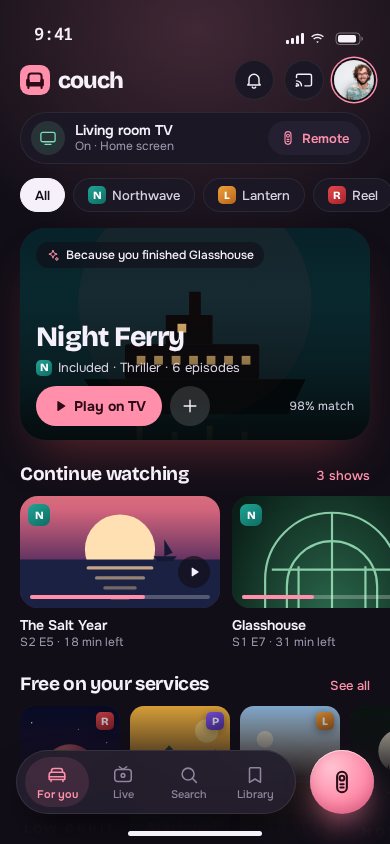
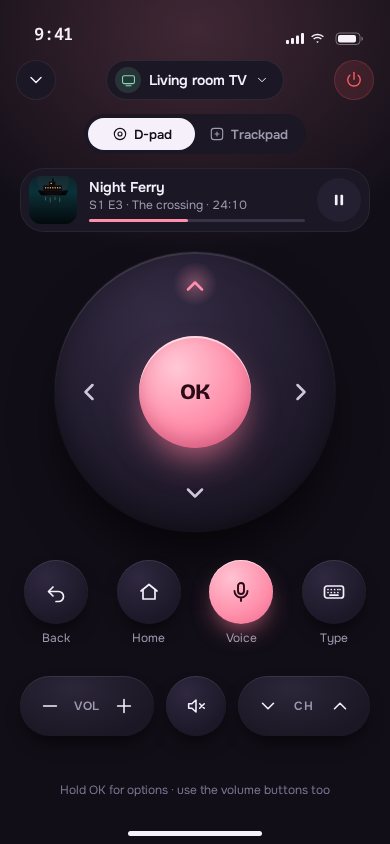
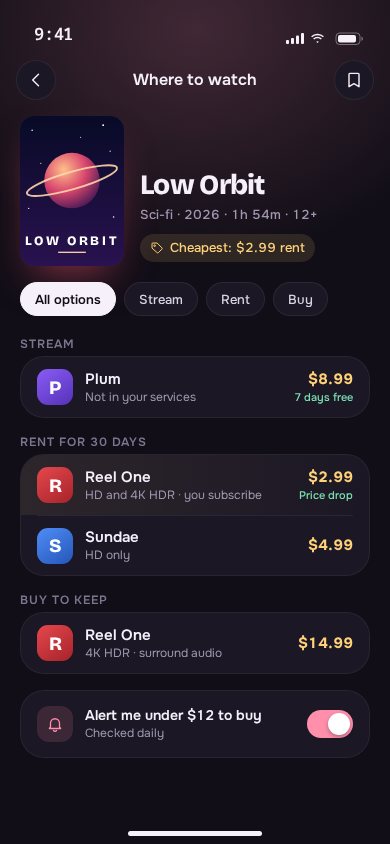
25 screens · Dark-first · Dark · Smart home
What the Figma file contains
| Part | What you get |
|---|---|
| Frames | 25 frames at 390 by 844, one per screen, each named after its screen (Welcome, Your services, Sign in and the rest). |
| Layers | Named layers in the order they draw: containers as frames, every label as live text you can edit, nothing flattened into a picture. |
| Colour styles | 9 colour styles, one per palette role (background, surface, text, text-muted and more), with the hex values below. Created when you import with the DraftScreens plugin. |
| Text styles | Headings in Bricolage Grotesque and body text in Onest, saved as text styles on import with the plugin. |
| Photos | The template's photos as image fills, at full resolution. They are free-licence stock used as placeholders: swap in your own before launch. |
| Vectors | Icons, logos and illustrations as vector layers, so they stay sharp and take a new colour in one click. |
Colour styles
| Style | Hex |
|---|---|
| Couch/background | #110e17 |
| Couch/surface | #1b1724 |
| Couch/text | #f5f0fa |
| Couch/text-muted | #a198b0 |
| Couch/accent | #ff8fab |
| Couch/accent-contrast | #2a0b16 |
| Couch/secondary | #ffd27a |
| Couch/border | #2b2538 |
| Couch/danger | #ff5a5f |
Text styles and fonts
Headings: Bricolage Grotesque. Body text: Onest. Cosy evening dark: a deep aubergine page (#110e17) with a faint velvet rose glow at the top, raised plum cards (#1b1724) with a hairline light border and a second step (#252031) for fields and inactive pills. Velvet rose (#ff8fab) is the single accent for the main action, the active tab, progress and selection; butter yellow (#ffd27a) marks prices, ratings and things coming soon; mint (#7be0b4) marks included and connected; red (#ff5a5f) is only for live. Headlines are set in Bricolage Grotesque extra bold with tight tracking, everything else in Onest. Every show and film has original flat poster artwork (sea at dusk, a ringed planet, a night ferry, a greenhouse, pines under a moon) with its title set inside the art, and a small rounded service tile in the corner. The signature is the pillow: the remote button, the d-pad and the confirm badge are soft rose or plum cushions lit from the top left with an inner highlight.
The 25 frames
| Frame | Screen type |
|---|---|
| Welcome | Onboarding |
| Your services | Onboarding |
| Sign in | Sign in |
| For you | Home |
| Title | Detail |
| Episodes | List |
| Where to watch | Detail |
| Rent | Checkout |
| Rented | Success |
| Search | Search |
| Browse | Search |
| Watchlist | List |
| Live | List |
| Channel | Media |
| Devices | List |
| Remote | Media |
| Trackpad | Media |
| Keyboard | Form |
| Casting | Tracking |
| Your week | Dashboard |
| Profiles | Profile |
| Profile | Profile |
| Couch Plus | Paywall |
| Notifications | List |
| Settings | Settings |
How to import it into Figma
- Get the template. Buy Couch (files from $10, every format included), use a free download from a paid plan, or open it with a Template Pass.
- Install DraftScreens for Figma. Download the plugin, then in the Figma desktop app choose Plugins, Development, Import plugin from manifest. A Figma Community listing is coming.
- Connect and import. Run the plugin, connect your DraftScreens account with a one-time code, pick Couch and import. The frames, colour styles and text styles land in the open file.
- Or drag in the SVGs. No plugin needed: the Figma download is also a folder of SVGs, one per screen. Drag them onto the canvas and each opens as editable layers.
Get the files
Remixing Couch is free. To get the template itself, the files are from $10, and one price unlocks every format:
- Figma. Every screen as editable layers: named frames, text, vectors and photos, with colour and text styles.
- React Native (Expo). An Expo Router project with every screen, the navigation between them, the theme and the icons.
- SwiftUI. An Xcode project for iOS 17 with a SwiftUI view per screen, fonts and assets.
- Flutter. A Flutter app with go_router, a widget per screen, fonts and assets.
- HTML. Each screen as a standalone HTML file with its fonts and photos, plus the design tokens as CSS and JSON.
Get the Couch files · Couch in Figma · Couch in React Native · Every template with a Template Pass ($49 for a year)
Couch in other formats
- Couch React Native template
- Couch in SwiftUI (in the same purchase)
- Couch in Flutter (in the same purchase)
- See every Couch screen and remix it free
More smart home Figma templates
- Dusk: Smart home scenarios
- Lumen: Smart home energy
- Abode: Smart home devices
- Boxed: Book movers and plan moving day
- Meter: Your energy supplier account
- Chime: Voice assistant and smart speaker
- Smart home app templates
- All Figma templates
Questions people ask
- What do I need installed?
- A Figma account (the free plan works). To import with the DraftScreens for Figma plugin you need the Figma desktop app until the plugin is listed in Figma Community. Dragging in the SVGs works anywhere, including Figma in the browser.
- Is it editable, or pictures of screens?
- Editable. Text stays live text in the template's fonts, icons are vectors, containers are frames, and colours and type are saved as styles. Photos are image fills you can replace.
- Does the same purchase include code?
- Yes. One price unlocks every format of Couch: Figma, React Native (Expo), SwiftUI, Flutter and HTML. A Template Pass ($49 for a year) unlocks every template.
- Can I use the Couch template commercially?
- Yes. You can build and ship commercial apps with it, for yourself or for clients, as many as you like. What you cannot do is resell or give away the template files themselves, as a template or a UI kit. The photos are free-licence stock used as placeholders: swap in your own before launch.
- Do I get updates?
- Yes, free. You buy the template, not a version: every download builds from the latest Couch design, and your library flags a template that changed since you last downloaded it.
- Is a backend included?
- No. The download is the interface: screens, navigation, styles and assets. There is no server, database, sign in, payments or API code, and the content on each screen is static sample data for you to replace.
- What is the difference between buying and remixing?
- Remixing is free: you describe your own app and it is drawn in Couch's design, in the DraftScreens studio. Buying gets you Couch itself as files, from $10, in Figma, React Native (Expo), SwiftUI, Flutter and HTML.