Templates · Home screens · Finance app · Recur
Recur Home screen
A home screen from Recur, a track and cancel subscriptions app template in a Minimal style. Screen 5 of 25.
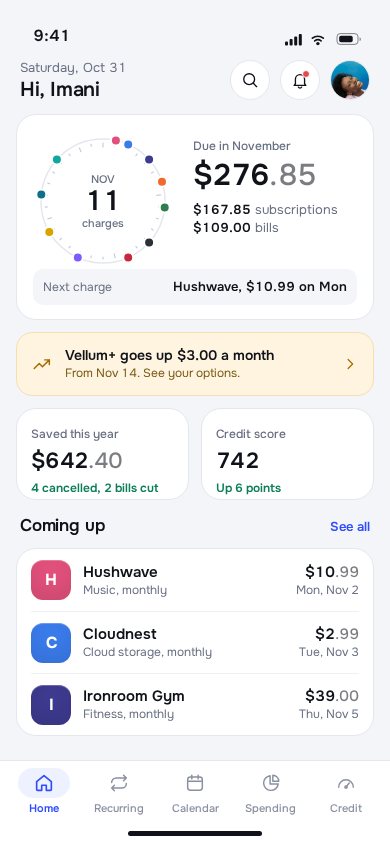
Recur is a complete subscription and bill manager: welcome, linking a bank, sign in and a code, a home with the month's renewal ring, every subscription with its next charge, a subscription page, a three step cancel flow ending in a confirmation, a price increase alert, a bill negotiation request with a live negotiation tracker, a charge calendar, spending, transactions, search, adding a subscription by hand, credit score, savings, linked accounts, notifications, a pay what you want plan, profile and settings. Cool grey and white with ink, cobalt, amber and green.
| Detail | Value |
|---|---|
| Screen type | Home |
| App | Recur: Track and cancel subscriptions |
| Category | Finance |
| Design language | Minimal, light |
| Type | Onest |
| Colours | #f4f5f8 background, #ffffff surface, #0f1218 text, #687083 text-muted, #2f4cff accent, #ffffff accent-contrast, #0f9f6e secondary, #e5e7ee border, #e5484d danger |
What this screen says
- Saturday, Oct 31
- Hi, Imani
- NOV
- charges
- Due in November $276.85
- $167.85 subscriptions
- $109.00 bills
- Next chargeHushwave, $10.99 on Mon
- Vellum+ goes up $3.00 a month
- From Nov 14. See your options.
- Saved this year $642.40 4 cancelled, 2 bills cut
- Credit score 742Up 6 points
- Coming up
- See all
- Hushwave
- Music, monthly
- Mon, Nov 2
- Cloudnest
- Cloud storage, monthly
- Tue, Nov 3
- Ironroom Gym
- Fitness, monthly
- Thu, Nov 5
- Home
- Recurring
- Calendar
- Spending
- Credit
Around it in Recur
More home screens
- Compound Home: Mutual funds and SIPs
- Halden Home: Premium neobank
- Billable Home: Time tracking and invoices, kept like a ledger
- Lease Home: Your tenancy, drawn to plan
- Claim Home: Expenses, filed like a till receipt
- Tally Home: Monthly budgeting
- Divvy Home: Split bills with friends
- Ticker Home: Stock investing
- Burrow Home: Shared savings pots
- Remit Home: International money transfer
- Piggy Home: Pocket money for kids
- Settle Home: Bill payments and banking
What makes a good home screen
- Put the most important thing first. Decide the one thing most people come for, like today's workout, a balance or the next booking, and give it the top of the screen.
- Make it feel current. Greetings with the time of day, today's date, fresh numbers and recent activity tell people the app is alive and about them.
- Keep quick actions within thumb reach. The two or three things people do most should be one tap away, in the lower part of the screen or a floating button.
- Group related content in clear sections. Use headings and spacing so the screen scans as a few blocks, not a long mixed list.
The full home screen guide and every example
Remix Recur free: describe your own app and it is drawn in this design. Or get its files from $10: Figma, React Native, SwiftUI, Flutter and HTML.