Templates · Home screens · Productivity app · Chrono
Chrono World screen
A home screen from Chrono, a productivity app template in a Dark-first style. Screen 4 of 25.
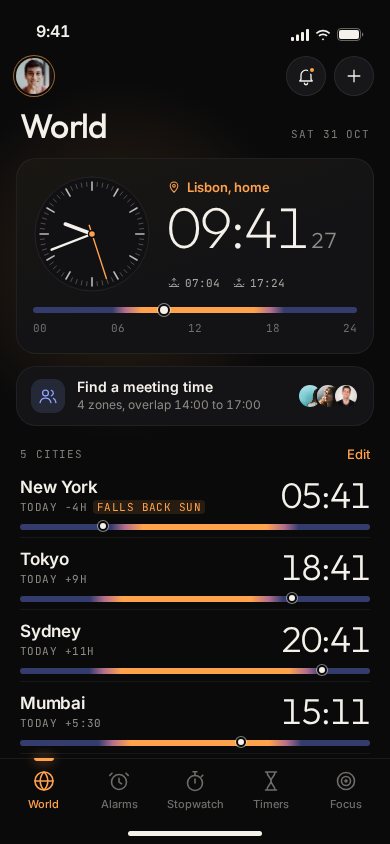
Chrono is a complete clock app: welcome, picking your cities, sign in, a world clock with a live dial and a daylight band for every city, city search and a city page with its sun arc, a meeting planner across zones with an invite and confirmation, alarms with an editor and a ringing screen, bedtime, a stopwatch with laps and lap splits, timers with presets, a new timer and a running ring, focus sessions, insights, widgets, notifications, a Pro plan, profile and settings. Obsidian black with sodium amber for day and periwinkle for night.
| Detail | Value |
|---|---|
| Screen type | Home |
| App | Chrono: World clock, timers and stopwatch |
| Category | Productivity |
| Design language | Dark-first, dark |
| Type | Outfit for headings, Inter for text |
| Colours | #0a0a0b background, #141416 surface, #f4f1ea text, #8f8c86 text-muted, #ffa24c accent, #1c1105 accent-contrast, #8fa2ff secondary, #242427 border, #ff6250 danger |
What this screen says
- World
- Sat 31 Oct
- Lisbon, home
- Find a meeting time4 zones, overlap 14:00 to 17:00
- 5 cities Edit
- New York
- TODAY −4HFALLS BACK SUN
- Tokyo
- TODAY +9H
- Sydney
- TODAY +11H
- Mumbai
- TODAY +5:30
- Alarms
- Stopwatch
- Timers
- Focus
Around it in Chrono
More home screens
- Replay Home: Record and share screen videos
- Easel Boards: Collaborative whiteboard
- Token Codes: Two-factor codes and sign-in approvals
- Beam Home: Send big files
- Parchment Home: Documents, edit and share
- Lectern Home: Slides and presenter remote
- Ringer Favourites: Phone, contacts and voicemail
- Pipeline Today: Sales CRM on the road
- Aim Today: Goals and key results
- Scribe Home: Voice memos to notes
- Inkline Home: Sign and send contracts
- Dispatch Today: Field service jobs for technicians
Every productivity app home screen
What makes a good home screen
- Put the most important thing first. Decide the one thing most people come for, like today's workout, a balance or the next booking, and give it the top of the screen.
- Make it feel current. Greetings with the time of day, today's date, fresh numbers and recent activity tell people the app is alive and about them.
- Keep quick actions within thumb reach. The two or three things people do most should be one tap away, in the lower part of the screen or a floating button.
- Group related content in clear sections. Use headings and spacing so the screen scans as a few blocks, not a long mixed list.
The full home screen guide and every example
Remix Chrono free: describe your own app and it is drawn in this design. Or get its files from $10: Figma, React Native, SwiftUI, Flutter and HTML.