Templates · Search and explore screens · Sports app · Canter
Canter Book a lesson screen
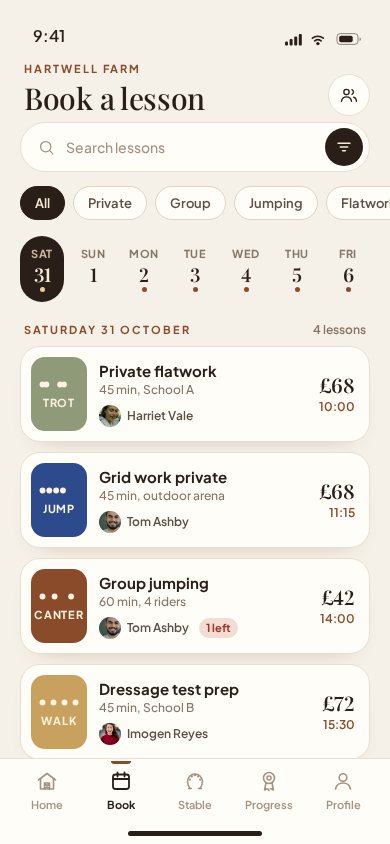
A search screen from Canter, a riding stables and lessons app template in a Luxury style. Screen 5 of 25.
Canter is a complete riding stables app: welcome, rider level and sign in, a home with the next lesson on a stitched leather card, lessons to book, instructors, the stable of horses and a horse profile, a month calendar with time slots, review, payment and a rosette confirmation, a lesson plan drawn on a dressage arena, a live ride with gait tracking, ride summaries, progress, a ride journal and log form, a trail ride, video review, shows and results, membership, notifications, profile and settings. Linen and espresso leather with cognac, brass and rosette blue.
| Detail | Value |
|---|---|
| Screen type | Search |
| App | Canter: Riding stables and lessons |
| Category | Sports |
| Design language | Luxury, light |
| Type | Playfair Display for headings, Plus Jakarta Sans for text |
| Colours | #f6f1e8 background, #fffdf8 surface, #2a1e18 text, #857567 text-muted, #8a4b2a accent, #f6ead6 accent-contrast, #2c4a8c secondary, #e8dfd0 border, #a3322b danger |
What this screen says
- Hartwell Farm
- Book a lesson
- Search lessons
- All Private Group Jumping Flatwork
- Sat 31
- Sun 1
- Mon 2
- Tue 3
- Wed 4
- Thu 5
- Fri 6
- Saturday 31 October
- 4 lessons
- trot
- Private flatwork45 min, School A
- Harriet Vale
- jump
- Grid work private45 min, outdoor arena
- Tom Ashby
- canter
- Group jumping60 min, 4 riders
- Tom Ashby1 left
- walk
- Dressage test prep45 min, School B
- Imogen Reyes
- Home
- Book
- Stable
- Progress
- Profile
Around it in Canter
More search and explore screens
- Tack Explore: Sailing wind and regatta tracker
- Frag Tournaments: Esports tournaments and teams
- Ollie Spot map: Skate spots and clips
- Eddy Map: River levels for paddlers
- Whistle Pitches: Grassroots league manager for coaches
- Oche Find a board: Darts scorer and leagues
- Lapse Pools: Swim training
- Angler Lake map: A fishing log drawn on the depth chart
- Piste Trail map: Ski resort companion
- Crag Find routes: Climbing gym logbook
- Fairway Courses: Golf course guide and scorecard
- Matchday Search: Football scores and fantasy
Every sports app search screen
What makes a good search screen
- Show something before people type. Recent searches, popular items or categories make the empty search screen useful and save typing.
- Suggest as people type. Autocomplete with matching items, not only matching words, lets people jump straight to a result.
- Make filters visible and reversible. Show active filters as chips that can be removed in one tap, and the number of results as filters change.
- Forgive typos. Close matches and "Did you mean" stop a spelling mistake from ending in an empty screen.
The full search screen guide and every example
Remix Canter free: describe your own app and it is drawn in this design. Or get its files from $10: Figma, React Native, SwiftUI, Flutter and HTML.