Templates · Home screens · Productivity app · Bench
Bench Home screen
A home screen from Bench, a freelance marketplace app template in an Enterprise style. Screen 4 of 25.
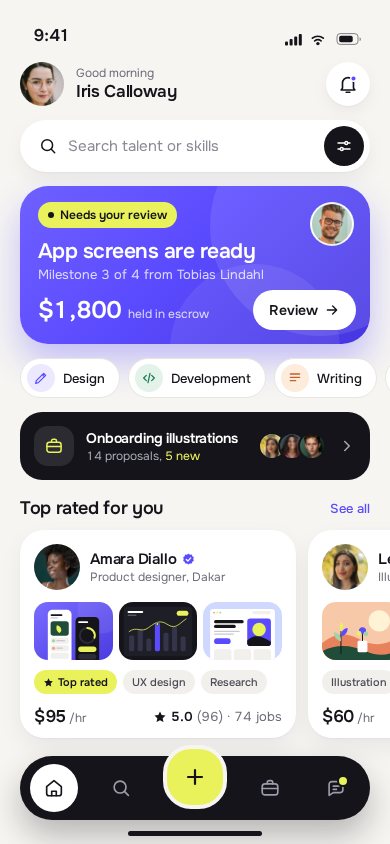
Bench is a complete freelance marketplace for clients: onboarding, role choice and sign in, a home with the contract that needs attention and top rated talent, categories, search with filters, a freelancer profile with portfolio, packages and reviews, posting a job with budget and timeline, proposals ranked by match score, messages and chat, sending an offer, a contract with a milestone timeline and escrow, milestone review, funding escrow, payments, leaving a review, profile and settings. Off white and white with ink, violet and lemon.
| Detail | Value |
|---|---|
| Screen type | Home |
| App | Bench: Freelance marketplace |
| Category | Productivity |
| Design language | Enterprise, light |
| Type | Onest |
| Colours | #f6f5f2 background, #ffffff surface, #14141a text, #6e6e7a text-muted, #5b4bff accent, #ffffff accent-contrast, #e9f25b secondary, #e8e6e0 border, #d9453d danger |
What this screen says
- Good morning Iris Calloway
- Search talent or skills
- Needs your review
- App screens are ready
- Milestone 3 of 4 from Tobias Lindahl
- $1,800held in escrow
- Review
- Design
- Development
- Writing
- Marketing
- Onboarding illustrations14 proposals, 5 new
- Top rated for youSee all
- Amara Diallo Product designer, Dakar
- Top rated UX design Research
- $95 /hr
- 5.0(96) · 74 jobs
- Leila Navabi Illustrator, Lisbon
- Illustration Editorial
- $60 /hr
- 4.9(131)
Around it in Bench
More home screens
- Jot Notes: Quick notes and checklists
- Chrono World: World clock, timers and stopwatch
- Frontdesk Home: Customer support inbox
- Campaign Home: Email marketing campaigns
- Outpost Queue: Schedule social posts
- Pageview Home: Website analytics
- Polish Home: Writing assistant and keyboard
- Tapline My page: Link-in-bio pages and analytics
- Quill Home: Docs, wikis and databases in one workspace
- Tandem Home: Team chat, channels and huddles
- Shipyard Home: Issue tracking for product teams
- Canvas Recents: Design files and comments on mobile
Every productivity app home screen
What makes a good home screen
- Put the most important thing first. Decide the one thing most people come for, like today's workout, a balance or the next booking, and give it the top of the screen.
- Make it feel current. Greetings with the time of day, today's date, fresh numbers and recent activity tell people the app is alive and about them.
- Keep quick actions within thumb reach. The two or three things people do most should be one tap away, in the lower part of the screen or a floating button.
- Group related content in clear sections. Use headings and spacing so the screen scans as a few blocks, not a long mixed list.
The full home screen guide and every example
Remix Bench free: describe your own app and it is drawn in this design. Or get its files from $10: Figma, React Native, SwiftUI, Flutter and HTML.