Templates · Home screens · Productivity app · Quill
Quill Home screen
A home screen from Quill, a productivity app template in a Minimal style. Screen 3 of 25.
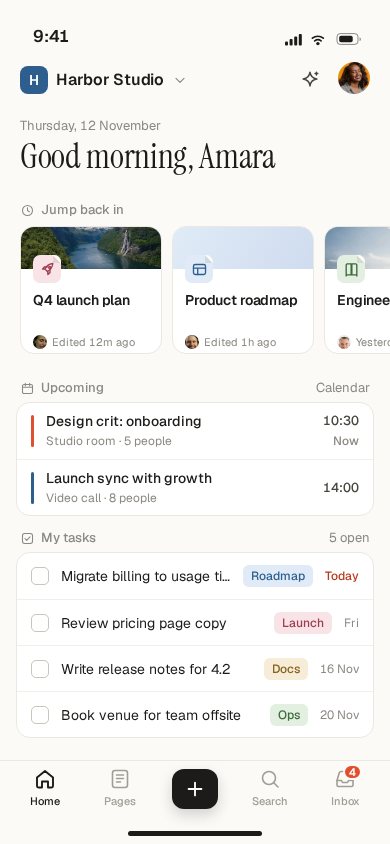
Quill is a complete everyday workspace: welcome and sign in with a code, a home with recent pages, events and my tasks, the page tree, a doc with cover, properties, to-dos, a callout and toggles, the slash menu over the keyboard, a verified team wiki, a database as a table, a board and a calendar, a task with properties and comments, a new task form, filters and sorts, search, templates, live meeting notes with a transcript, an assistant that answers from your pages, sharing, the inbox, workspace analytics, plans, checkout and a confirmation, account and settings. Paper white and ink with a vermilion accent.
| Detail | Value |
|---|---|
| Screen type | Home |
| App | Quill: Docs, wikis and databases in one workspace |
| Category | Productivity |
| Design language | Minimal, light |
| Type | Instrument Serif for headings, Geist for text |
| Colours | #fbfaf7 background, #ffffff surface, #1c1b19 text, #8c8982 text-muted, #e04f2e accent, #ffffff accent-contrast, #f3f1ec secondary, #ebe8e1 border, #b83a1d danger |
What this screen says
- HHarbor Studio
- Thursday, 12 November
- Good morning, Amara
- Jump back in
- Q4 launch plan Edited 12m ago
- Product roadmap Edited 1h ago
- Engineering wiki Yesterday
- Upcoming Calendar
- Design crit: onboardingStudio room · 5 people
- Now
- Launch sync with growthVideo call · 8 people
- My tasks 5 open
- Migrate billing to usage tiersRoadmap Today
- Review pricing page copyLaunch Fri
- Write release notes for 4.2Docs 16 Nov
- Book venue for team offsiteOps 20 Nov
- Home
- Pages
- Search
- 4 Inbox
Around it in Quill
More home screens
- Stow Home: Cloud storage
- Meridian Start page: Mobile web browser
- Swarm Transfers: Torrent client
- Bench Home: Freelance marketplace
- Convene Home: Video meetings
- Unplug Home: Screen time blocker
- Streak Today: Small days, long chains
- Deskly Home: Hybrid office booking
- Pomo Home: Focus timer
- Postbox Inbox: Email for busy teams
- Daybook Today: Calendar and planner
- Scanly Home: Document scanner
Every productivity app home screen
What makes a good home screen
- Put the most important thing first. Decide the one thing most people come for, like today's workout, a balance or the next booking, and give it the top of the screen.
- Make it feel current. Greetings with the time of day, today's date, fresh numbers and recent activity tell people the app is alive and about them.
- Keep quick actions within thumb reach. The two or three things people do most should be one tap away, in the lower part of the screen or a floating button.
- Group related content in clear sections. Use headings and spacing so the screen scans as a few blocks, not a long mixed list.
The full home screen guide and every example
Remix Quill free: describe your own app and it is drawn in this design. Or get its files from $10: Figma, React Native, SwiftUI, Flutter and HTML.