Templates · Home screens · Productivity app · Outpost
Outpost Queue screen
A home screen from Outpost, a schedule social posts app template in a Minimal style. Screen 4 of 25.
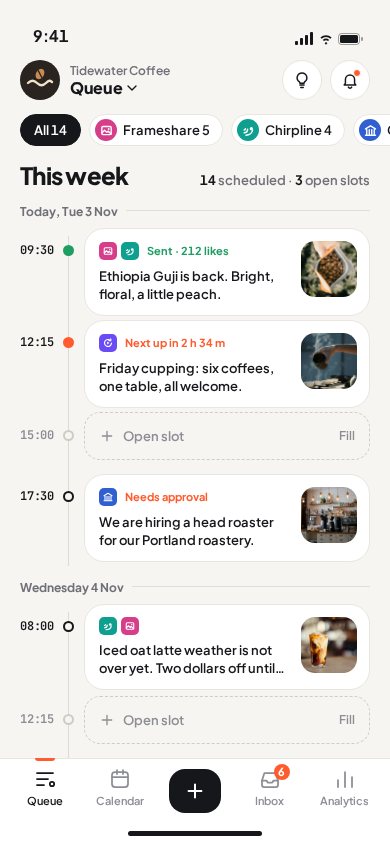
Outpost is a complete social scheduling app for a small team: welcome, channel connecting, sign in, a queue of time slots, compose with per-channel previews, image cropping, scheduling with best times and a confirmation, a month calendar, post details, an ideas board, posting times, analytics and post stats, a channel page, an engagement inbox and replies, team approvals and review, search, notifications, a Pro plan, profile and settings. Paper white and ink with a signal orange accent and a colour per channel.
| Detail | Value |
|---|---|
| Screen type | Home |
| App | Outpost: Schedule social posts |
| Category | Productivity |
| Design language | Minimal, light |
| Type | JetBrains Mono for headings, Plus Jakarta Sans for text |
| Colours | #f6f5f1 background, #ffffff surface, #16171b text, #6f7078 text-muted, #ff5b2e accent, #fff0ea accent-soft, #e8e6e0 border, #1f9d63 success, #0e9f8e channel-1, #d63e8a channel-2, #2f5fd0 channel-3, #6a4cf5 channel-4, #5f8f2e channel-5 |
What this screen says
- Tidewater CoffeeQueue
- All 14 Frameshare 5 Chirpline 4 Guildhall 2 Loopcast 2
- This week
- 14 scheduled · 3 open slots
- Today, Tue 3 Nov
- Sent · 212 likes
- Ethiopia Guji is back. Bright, floral, a little peach.
- Next up in 2 h 34 m
- Friday cupping: six coffees, one table, all welcome.
- Open slotFill
- Needs approval
- We are hiring a head roaster for our Portland roastery.
- Wednesday 4 Nov
- Iced oat latte weather is not over yet. Two dollars off until noon.
- Queue
- Calendar
- 6Inbox
- Analytics
Around it in Outpost
More home screens
- Campaign Home: Email marketing campaigns
- Pageview Home: Website analytics
- Polish Home: Writing assistant and keyboard
- Tapline My page: Link-in-bio pages and analytics
- Quill Home: Docs, wikis and databases in one workspace
- Tandem Home: Team chat, channels and huddles
- Shipyard Home: Issue tracking for product teams
- Canvas Recents: Design files and comments on mobile
- Merge Home: Code, pull requests and reviews
- Query Home: AI answers with sources
- Glossa Translate: Translate text, voice and camera
- Layout Home: Design anything from templates
Every productivity app home screen
What makes a good home screen
- Put the most important thing first. Decide the one thing most people come for, like today's workout, a balance or the next booking, and give it the top of the screen.
- Make it feel current. Greetings with the time of day, today's date, fresh numbers and recent activity tell people the app is alive and about them.
- Keep quick actions within thumb reach. The two or three things people do most should be one tap away, in the lower part of the screen or a floating button.
- Group related content in clear sections. Use headings and spacing so the screen scans as a few blocks, not a long mixed list.
The full home screen guide and every example
Remix Outpost free: describe your own app and it is drawn in this design. Or get its files from $10: Figma, React Native, SwiftUI, Flutter and HTML.