Templates · Home screens · Productivity app · Polish
Polish Home screen
A home screen from Polish, a writing assistant and keyboard app template in a Glass style. Screen 5 of 25.
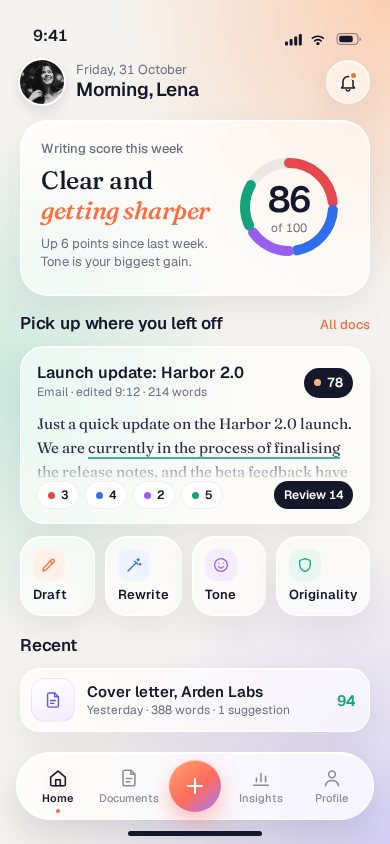
Polish is a complete writing assistant: welcome, writing goals, sign in and keyboard setup, a home with the weekly writing score, documents, an editor with colour coded underlines, suggestion cards, a full suggestion list, a tone detector, sentence rewrites, a score breakdown, the keyboard inside a chat with inline fixes and a rewrite panel, drafting a new document, an originality check, weekly insights, a personal dictionary, a team style guide, Polish Pro with checkout and a success screen, notifications, profile and settings. Pearl glass with apricot, mint and lilac light, ink buttons and four suggestion colours.
| Detail | Value |
|---|---|
| Screen type | Home |
| App | Polish: Writing assistant and keyboard |
| Category | Productivity |
| Design language | Glass, light |
| Type | Fraunces for headings, Geist for text |
| Colours | #f5f3ef background, #ffffff surface, #15172a text, #6c6f82 text-muted, #ff6b3d accent, #ffffff accent-contrast, #9b5cf0 secondary, #e8e5ee border, #e5484d danger |
What this screen says
- Friday, 31 October
- Morning, Lena
- Writing score this week
- Clear and
- getting sharper
- Up 6 points since last week. Tone is your biggest gain.
- 86of 100
- Pick up where you left off
- All docs
- Launch update: Harbor 2.0
- Email · edited 9:12 · 214 words
- Just a quick update on the Harbor 2.0 launch. We are currently in the process of finalising the release notes, and...
- 3 4 2 5 Review 14
- Draft
- Rewrite
- Tone
- Originality
- Recent
- Cover letter, Arden Labs
- Yesterday · 388 words · 1 suggestion
- Home Documents Insights Profile
Around it in Polish
More home screens
- Jot Notes: Quick notes and checklists
- Chrono World: World clock, timers and stopwatch
- Frontdesk Home: Customer support inbox
- Campaign Home: Email marketing campaigns
- Outpost Queue: Schedule social posts
- Pageview Home: Website analytics
- Tapline My page: Link-in-bio pages and analytics
- Quill Home: Docs, wikis and databases in one workspace
- Tandem Home: Team chat, channels and huddles
- Shipyard Home: Issue tracking for product teams
- Canvas Recents: Design files and comments on mobile
- Merge Home: Code, pull requests and reviews
Every productivity app home screen
What makes a good home screen
- Put the most important thing first. Decide the one thing most people come for, like today's workout, a balance or the next booking, and give it the top of the screen.
- Make it feel current. Greetings with the time of day, today's date, fresh numbers and recent activity tell people the app is alive and about them.
- Keep quick actions within thumb reach. The two or three things people do most should be one tap away, in the lower part of the screen or a floating button.
- Group related content in clear sections. Use headings and spacing so the screen scans as a few blocks, not a long mixed list.
The full home screen guide and every example
Remix Polish free: describe your own app and it is drawn in this design. Or get its files from $10: Figma, React Native, SwiftUI, Flutter and HTML.