Templates · Home screens · Productivity app · Jot
Jot Notes screen
A home screen from Jot, a quick notes and checklists app template in a Minimal style. Screen 4 of 25.
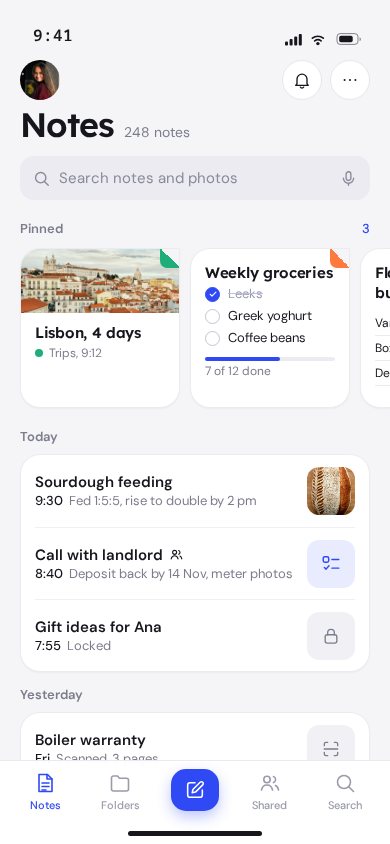
Jot is a complete everyday notes app: welcome, storage setup, sign in, a notes home with pinned cards and today's notes, folders with smart folders, a gallery folder, a note with a photo and checklist, a shared grocery checklist, a budget table, a sketch canvas with a tool tray, a document camera and the scanned result with found text, a format sheet, search that reaches inside tables and scans, tags, shared notes with live collaboration, sharing and an invite confirmation, a locked note, insights, notifications, a Plus plan, profile and settings. Cool paper grey and white with cobalt ink and a tangerine fold.
| Detail | Value |
|---|---|
| Screen type | Home |
| App | Jot: Quick notes and checklists |
| Category | Productivity |
| Design language | Minimal, light |
| Type | Lexend for headings, DM Sans for text |
| Colours | #f5f5f8 background, #ffffff surface, #16161d text, #7c7d8c text-muted, #2f49f5 accent, #ffffff accent-contrast, #ff7a3d secondary, #ebebf1 border, #ec4f8b danger |
What this screen says
- Notes
- 248 notes
- Search notes and photos
- Pinned 3
- Lisbon, 4 days
- Trips, 9:12
- Weekly groceries
- Leeks
- Greek yoghurt
- Coffee beans
- 7 of 12 done
- Flat move budget
- Van
- Boxes
- Deposit
- Today
- Sourdough feeding
- 9:30Fed 1:5:5, rise to double by 2 pm
- Call with landlord
- 8:40Deposit back by 14 Nov, meter photos
- Gift ideas for Ana
- 7:55Locked
- Yesterday
- Boiler warranty
- FriScanned, 3 pages
- Folders
- Shared
- Search
Around it in Jot
More home screens
- Chrono World: World clock, timers and stopwatch
- Frontdesk Home: Customer support inbox
- Campaign Home: Email marketing campaigns
- Outpost Queue: Schedule social posts
- Pageview Home: Website analytics
- Polish Home: Writing assistant and keyboard
- Tapline My page: Link-in-bio pages and analytics
- Quill Home: Docs, wikis and databases in one workspace
- Tandem Home: Team chat, channels and huddles
- Shipyard Home: Issue tracking for product teams
- Canvas Recents: Design files and comments on mobile
- Merge Home: Code, pull requests and reviews
Every productivity app home screen
What makes a good home screen
- Put the most important thing first. Decide the one thing most people come for, like today's workout, a balance or the next booking, and give it the top of the screen.
- Make it feel current. Greetings with the time of day, today's date, fresh numbers and recent activity tell people the app is alive and about them.
- Keep quick actions within thumb reach. The two or three things people do most should be one tap away, in the lower part of the screen or a floating button.
- Group related content in clear sections. Use headings and spacing so the screen scans as a few blocks, not a long mixed list.
The full home screen guide and every example
Remix Jot free: describe your own app and it is drawn in this design. Or get its files from $10: Figma, React Native, SwiftUI, Flutter and HTML.