Templates · Settings screens · Education app · Zenith
Zenith Settings screen
A settings screen from Zenith, a night sky guide app template in a Dark-first style. Screen 25 of 25.
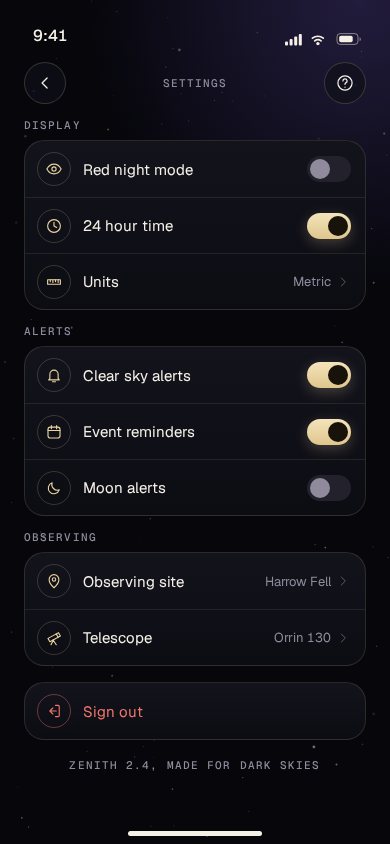
Zenith is a complete stargazing app: welcome, sign in, choosing an observing site, tonight's sky at a glance, a round sky map with a time ruler, search, planets and a planet page with an altitude curve, constellations and a constellation plate, a deep sky object, the moon, an events calendar and a meteor shower, the seeing forecast, a light pollution map, an observing log with a new entry and its confirmation, telescope tips with a step by step lesson, a Plus plan, notifications, profile and settings. Everything reads like an engraved star atlas lit in pale gold.
| Detail | Value |
|---|---|
| Screen type | Settings |
| App | Zenith: Night sky guide |
| Category | Education |
| Design language | Dark-first, dark |
| Type | Geist |
| Colours | #06060b background, #101018 surface, #f5f0e6 text, #8f8b9c text-muted, #e9d3a0 accent, #17130a accent-contrast, #9d8cf0 secondary, #2a2620 border, #f0766a danger |
What this screen says
- Settings
- Display
- Red night mode
- 24 hour time
- Units
- Metric
- Alerts
- Clear sky alerts
- Event reminders
- Moon alerts
- Observing
- Observing site
- Harrow Fell
- Telescope
- Orrin 130
- Sign out
- Zenith 2.4, made for dark skies
Around it in Zenith
More settings screens
- Numo Settings: Kids maths game
- Syntax Settings: Learn to code
- Tuckin Parent controls: Bedtime stories for kids
- Chalk Settings: Design courses
- Encore Settings: Creator courses
- Classroom Settings: Class stream and assignments
- Studyhall Settings: Free lessons and practice for school
- Tutor Settings: Book online tutors for any skill
- Leaf Display: E-books and reading
- Almanac Settings: The free encyclopedia reader
- Tiles Settings: Daily word and number puzzles
- Stacks Settings: Borrow e-books and audiobooks from your library
Every education app settings screen
What makes a good settings screen
- Group options into clear sections. Account, notifications, privacy, appearance and help, with headings, so people scan to the right group.
- Label settings by their effect. "Daily reminder at 8:00" is clearer than "Reminders". Add a short description under options that need one.
- Use the right control. Toggles for on and off, a row that opens a list for choices, and sliders only for ranges.
- Apply changes immediately. Most mobile settings take effect when changed, with no Save button to forget.
The full settings screen guide and every example
Remix Zenith free: describe your own app and it is drawn in this design. Or get its files from $10: Figma, React Native, SwiftUI, Flutter and HTML.