Templates · Settings screens · Education app · Syntax
Syntax Settings screen
A settings screen from Syntax, a learn to code app template in a Dark-first style. Screen 25 of 25.
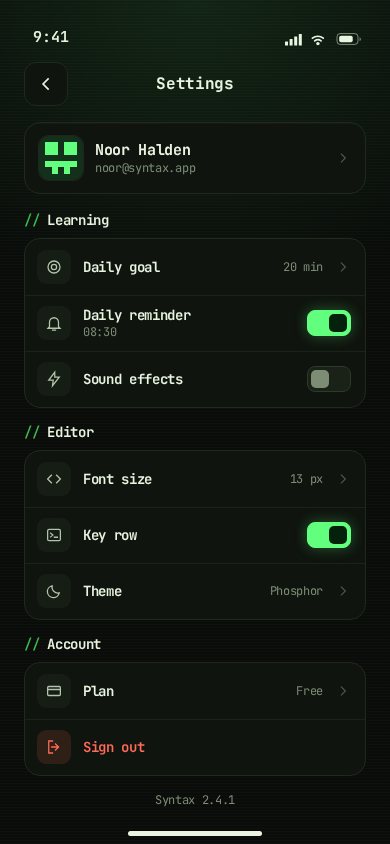
Syntax is a complete app for learning to code on a phone: welcome, picking a track, sign in and account creation, a home with the lesson to resume and a daily challenge, tracks, a track laid out as numbered lines, a lesson, a code editor with a key row and live output, lesson complete, challenges with test results, a streak with a contribution grid, progress charts, saved snippets, community questions and answers, a certificate, a Pro plan, notifications, profile and settings. Green means it ran or passed, amber marks where you are.
| Detail | Value |
|---|---|
| Screen type | Settings |
| App | Syntax: Learn to code |
| Category | Education |
| Design language | Dark-first, dark |
| Type | JetBrains Mono |
| Colours | #090c09 background, #0f140e surface, #e9f5e1 text, #7c8c75 text-muted, #62ff7e accent, #04210b accent-contrast, #ffb629 secondary, #1f2a1d border, #ff6b57 danger |
What this screen says
- Settings
- Noor Halden
- noor@syntax.app
- //Learning
- Daily goal
- 20 min
- Daily reminder
- Sound effects
- //Editor
- Font size
- 13 px
- Key row
- Theme
- Phosphor
- //Account
- Plan
- Free
- Sign out
- Syntax 2.4.1
Around it in Syntax
More settings screens
- Wren Settings: Early reading for kids
- Proof Settings: Maths tutor that shows its working
- Skim Settings: Speed reading trainer
- Terra Settings: Geography and flags quiz
- Gambit Settings: Chess training
- Buzzer Settings: Live trivia
- Homeroom Settings: School, all on one page
- Parla Settings: Language learning
- Recall Settings: Flashcards and spaced repetition
- Numo Settings: Kids maths game
- Tuckin Parent controls: Bedtime stories for kids
- Zenith Settings: Night sky guide
Every education app settings screen
What makes a good settings screen
- Group options into clear sections. Account, notifications, privacy, appearance and help, with headings, so people scan to the right group.
- Label settings by their effect. "Daily reminder at 8:00" is clearer than "Reminders". Add a short description under options that need one.
- Use the right control. Toggles for on and off, a row that opens a list for choices, and sliders only for ranges.
- Apply changes immediately. Most mobile settings take effect when changed, with no Save button to forget.
The full settings screen guide and every example
Remix Syntax free: describe your own app and it is drawn in this design. Or get its files from $10: Figma, React Native, SwiftUI, Flutter and HTML.