Templates · Settings screens · Education app · Encore
Encore Settings screen
A settings screen from Encore, a creator courses app template in a Dark-first style. Screen 25 of 25.
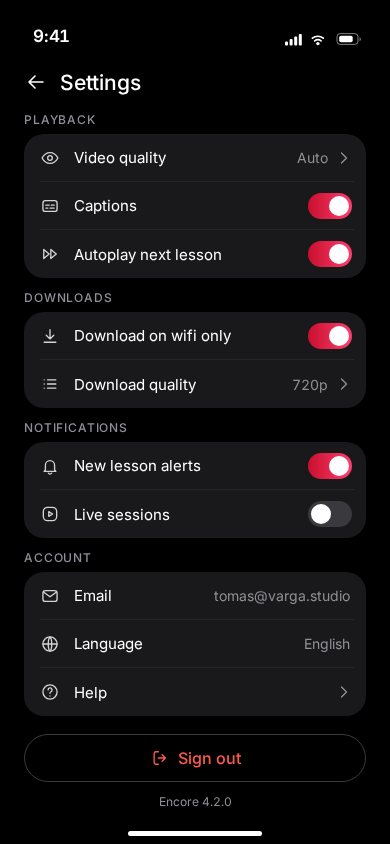
Encore is a complete creator course marketplace: welcome, sign in, a verification code, interests, a feed with a featured course and continue watching, explore, search, categories, a course page with chapters, the lesson player, reviews, creators and creator profiles, subscription plans, checkout, a confirmation, my courses, downloads, a saved list, learning progress, a certificate, purchases, account and settings. Pure black with a single crimson to pink gradient and plenty of photography.
| Detail | Value |
|---|---|
| Screen type | Settings |
| App | Encore: Creator courses |
| Category | Education |
| Design language | Dark-first, dark |
| Type | Inter |
| Colours | #000000 background, #1a1a1c surface, #ffffff text, #8f8f97 text-muted, #ee2752 accent, #ffffff accent-contrast, #3a3a3e secondary, #2a2a2e border, #ff5a4d danger |
What this screen says
- Settings
- Playback
- Video quality Auto
- Captions
- Autoplay next lesson
- Downloads
- Download on wifi only
- Download quality 720p
- Notifications
- New lesson alerts
- Live sessions
- Account
- Email tomas@varga.studio
- Language English
- Help
- Sign out
- Encore 4.2.0
Around it in Encore
More settings screens
- Tuckin Parent controls: Bedtime stories for kids
- Zenith Settings: Night sky guide
- Chalk Settings: Design courses
- Classroom Settings: Class stream and assignments
- Studyhall Settings: Free lessons and practice for school
- Tutor Settings: Book online tutors for any skill
- Leaf Display: E-books and reading
- Almanac Settings: The free encyclopedia reader
- Tiles Settings: Daily word and number puzzles
- Stacks Settings: Borrow e-books and audiobooks from your library
- Penpal Settings: Language exchange chat
- Lexis Settings: A word a day
Every education app settings screen
What makes a good settings screen
- Group options into clear sections. Account, notifications, privacy, appearance and help, with headings, so people scan to the right group.
- Label settings by their effect. "Daily reminder at 8:00" is clearer than "Reminders". Add a short description under options that need one.
- Use the right control. Toggles for on and off, a row that opens a list for choices, and sliders only for ranges.
- Apply changes immediately. Most mobile settings take effect when changed, with no Save button to forget.
The full settings screen guide and every example
Remix Encore free: describe your own app and it is drawn in this design. Or get its files from $10: Figma, React Native, SwiftUI, Flutter and HTML.